// Variation A Faithful Plus (extended)
// Centered serif nameplate, intro paragraph, year-marker timeline grid, sticky lang toggle,
// cursor preview on hover, About page, PDF download button.

const { useState, useMemo, useEffect, useRef } = React;

function VariantA({ tweaks }) {
  const [route, setRoute] = useState({ name: "work" });
  const [lang, setLang] = useState("en");
  const [filter, setFilter] = useState("all");
  const [transitioning, setTransitioning] = useState(false);
  const t = COPY[lang];
  const mainRef = useRef(null);
  const workScrollRef = useRef(0);
  const { state: lbState, handleClick: lbClick, close: lbClose, prev: lbPrev, next: lbNext } = useLightbox(mainRef);

  const go = (next) => {
    if (route.name === "work") {
      workScrollRef.current = window.scrollY || document.documentElement.scrollTop || 0;
    }
    setTransitioning(true);
    setTimeout(() => {
      setRoute(next);
      if (next.name === "work") {
        // Wait a frame for the grid to render before restoring scroll position
        requestAnimationFrame(() => {
          requestAnimationFrame(() => {
            window.scrollTo?.({ top: workScrollRef.current });
          });
        });
      } else {
        window.scrollTo?.({ top: 0 });
      }
      setTransitioning(false);
    }, 280);
  };

  const filtered = useMemo(() => {
    if (filter === "all") return PROJECTS;
    return PROJECTS.filter((p) => (p.catLabel || p.cat) === filter);
  }, [filter]);

  const cats = ["all", ...Array.from(new Set(PROJECTS.map((p) => p.catLabel || p.cat)))];

  const headerAlign = tweaks.headerAlign;
  const cols = tweaks.cols;
  const aspect = tweaks.tileAspect;
  const bgMode = tweaks.bgMode;

  const palette = bgMode === "dark" ?
  { bg: "#0E0E10", fg: "#F2F1ED", muted: "rgba(242,241,237,0.55)", line: "rgba(242,241,237,0.12)" } :
  bgMode === "cream" ?
  { bg: "#F5F0E6", fg: "#1A1A1C", muted: "rgba(26,26,28,0.55)", line: "rgba(26,26,28,0.10)" } :
  { bg: "#FFFFFF", fg: "#111113", muted: "rgba(17,17,19,0.55)", line: "rgba(17,17,19,0.08)" };

  return (
    <div style={{
      "--bg": palette.bg, "--fg": palette.fg, "--muted": palette.muted, "--line": palette.line,
      "--serif": `"${tweaks.fontSerif}", "Times New Roman", serif`,
      "--sans": `"${tweaks.fontSans}", -apple-system, system-ui, sans-serif`,
      background: "var(--bg)", color: "var(--fg)",
      fontFamily: "var(--sans)", minHeight: "100vh",
      display: "flex", flexDirection: "column",
      transition: "background .4s ease, color .4s ease",
      position: "relative"
    }}>
      {/* lang toggle is inside the header nav row */}

      <header className="va-header" style={{
        padding: "32px 48px 0"
      }}>
        {/* Top bar: sticky nav left, sticky lang right */}
        <div className="va-topbar" style={{ display: "flex", justifyContent: "space-between", alignItems: "center", gap: 12 }}>
          <StickyNav route={route} go={go} t={t} />
          <StickyLangToggle lang={lang} setLang={setLang} />
        </div>

        {/* Nameplate hidden on case study pages */}
        {route.name !== "case" && (
        <div className="va-nameplate" style={{
          textAlign: headerAlign === "center" ? "center" : "left",
          marginTop: 120
        }}>
          <h1 style={{
            fontFamily: "Helvetica",
            fontSize: "clamp(40px, 5.4vw, 78px)",
            lineHeight: 0.95, letterSpacing: "-0.02em", fontWeight: 400, margin: 0
          }}>Rowan de Maa</h1>
          <p style={{ fontStyle: "italic", fontFamily: "var(--serif)", color: "var(--muted)", margin: "10px 0 0", fontSize: 18 }}>
            {t.role}
          </p>
        </div>
        )}
      </header>

      {/* Intro paragraph removed */}

      <main className="va-main" ref={mainRef} onClick={lbClick} style={{
        padding: "48px 48px 80px", maxWidth: 1180, margin: "0 auto",
        width: "100%", flex: "1 0 auto",
        opacity: transitioning ? 0 : 1,
        transform: transitioning ? "translateY(8px)" : "translateY(0)",
        transition: "opacity .28s ease, transform .28s ease"
      }}>
        {route.name === "work" &&
        <WorkGrid
          t={t} cats={cats} filter={filter} setFilter={setFilter}
          cols={cols} aspect={aspect} filtered={filtered}
          onOpen={(id) => go({ name: "case", id })} />

        }
        {route.name === "case" && route.id === "flipped-out" &&
        <FlippedOutCase lang={lang} t={t} onBack={() => go({ name: "work" })} onMore={() => go({ name: "case", id: nextCaseId(route.id) })} />
        }
        {route.name === "case" && route.id === "drawings-18" &&
        <DrawingsCase lang={lang} t={t} onBack={() => go({ name: "work" })} onMore={() => go({ name: "case", id: nextCaseId(route.id) })} />
        }
        {route.name === "case" && route.id === "drawings-19" &&
        <Drawings19Case lang={lang} t={t} onBack={() => go({ name: "work" })} onMore={() => go({ name: "case", id: nextCaseId(route.id) })} />
        }
        {route.name === "case" && route.id === "stibat" &&
        <StibatCase lang={lang} t={t} onBack={() => go({ name: "work" })} onMore={() => go({ name: "case", id: nextCaseId(route.id) })} />
        }
        {route.name === "case" && route.id === "wear-to-dear" &&
        <WearToDareCase lang={lang} t={t} onBack={() => go({ name: "work" })} onMore={() => go({ name: "case", id: nextCaseId(route.id) })} />
        }
        {route.name === "case" && route.id === "instagram" &&
        <SocialsCase lang={lang} t={t} onBack={() => go({ name: "work" })} onMore={() => go({ name: "case", id: nextCaseId(route.id) })} />
        }
        {route.name === "case" && route.id === "energyzero" &&
        <EnergyZeroCase lang={lang} t={t} onBack={() => go({ name: "work" })} onMore={() => go({ name: "case", id: nextCaseId(route.id) })} />
        }
        {route.name === "case" && route.id === "keiretsu" &&
        <KeiretsuCase lang={lang} t={t} onBack={() => go({ name: "work" })} onMore={() => go({ name: "case", id: nextCaseId(route.id) })} />
        }
        {route.name === "case" && route.id === "thunderstorm" &&
        <ThunderstormCase lang={lang} t={t} onBack={() => go({ name: "work" })} onMore={() => go({ name: "case", id: nextCaseId(route.id) })} />
        }
        {route.name === "case" && route.id === "vibe-coding" &&
        <VibeCodingCase lang={lang} t={t} onBack={() => go({ name: "work" })} onMore={() => go({ name: "case", id: nextCaseId(route.id) })} />
        }
        {route.name === "case" && route.id !== "flipped-out" && route.id !== "drawings-18" && route.id !== "drawings-19" && route.id !== "stibat" && route.id !== "wear-to-dear" && route.id !== "instagram" && route.id !== "vibe-coding" && route.id !== "energyzero" && route.id !== "keiretsu" && route.id !== "thunderstorm" &&
        <CaseStudy id={route.id} lang={lang} t={t} onBack={() => go({ name: "work" })} onMore={() => go({ name: "case", id: nextCaseId(route.id) })} />
        }
        {route.name === "case" &&
        <div style={{ maxWidth: 920, margin: "0 auto", marginTop: 56, paddingTop: 32, borderTop: "1px solid var(--line)" }}>
          <h3 style={{ fontSize: 12, letterSpacing: ".12em", textTransform: "uppercase", color: "var(--muted)", margin: "0 0 20px", fontWeight: 500 }}>
            {lang === "nl" ? "Ander werk" : "Other work"}
          </h3>
          <div style={{ display: "grid", gridTemplateColumns: "repeat(3, 1fr)", gap: 20 }}>
            {otherProjects(route.id).map((p) =>
            <button key={p.id} onClick={() => go({ name: "case", id: p.id })} style={{ background: "none", border: "none", padding: 0, cursor: "pointer", textAlign: "left", display: "flex", flexDirection: "column" }}>
              <div style={{ background: p.bg, aspectRatio: "4 / 3", borderRadius: 8, display: "flex", alignItems: "center", justifyContent: "center", overflow: "hidden", transition: "transform .3s cubic-bezier(.2,.7,.2,1)" }}
                onMouseEnter={(e) => e.currentTarget.style.transform = "translateY(-4px)"}
                onMouseLeave={(e) => e.currentTarget.style.transform = "translateY(0)"}>
                <img src={p.thumb} alt="" style={{ width: "72%", height: "72%", objectFit: "contain", filter: "drop-shadow(0 8px 16px rgba(0,0,0,0.14))" }} />
              </div>
              <div style={{ marginTop: 10, fontFamily: "var(--serif)", fontSize: 16, lineHeight: 1.25, height: "2.5em", overflow: "hidden" }}>{p.name}</div>
              <div style={{ fontSize: 12, color: "var(--muted)" }}>{(p.catLabel || p.cat)} · {p.year}</div>
            </button>)}
          </div>
        </div>
        }
        {route.name === "cv" && <CVPage lang={lang} t={t} />}
        {route.name === "about" && <AboutPage lang={lang} t={t} />}
        {route.name === "contact" && <ContactPage lang={lang} t={t} />}
      </main>

      <footer className="va-footer" style={{ padding: "24px 48px 36px", borderTop: "1px solid var(--line)",
        display: "flex", justifyContent: "space-between", fontSize: 12, color: "var(--muted)" }}>
        <span>{t.madeWith}</span>
        <span style={{ display: "flex", gap: 18, alignItems: "center" }}>
          <a style={linkStyle} href="#" onClick={e => e.preventDefault()} aria-label="LinkedIn">
            <svg width="16" height="16" viewBox="0 0 24 24" fill="currentColor"><path d="M20.447 20.452h-3.554v-5.569c0-1.328-.027-3.037-1.852-3.037-1.853 0-2.136 1.445-2.136 2.939v5.667H9.351V9h3.414v1.561h.046c.477-.9 1.637-1.85 3.37-1.85 3.601 0 4.267 2.37 4.267 5.455v6.286zM5.337 7.433a2.062 2.062 0 01-2.063-2.065 2.064 2.064 0 112.063 2.065zm1.782 13.019H3.555V9h3.564v11.452zM22.225 0H1.771C.792 0 0 .774 0 1.729v20.542C0 23.227.792 24 1.771 24h20.451C23.2 24 24 23.227 24 22.271V1.729C24 .774 23.2 0 22.222 0h.003z"/></svg>
          </a>
          <a style={linkStyle} href="#" onClick={e => e.preventDefault()} aria-label="Instagram">
            <svg width="16" height="16" viewBox="0 0 24 24" fill="currentColor"><path d="M12 2.163c3.204 0 3.584.012 4.85.07 3.252.148 4.771 1.691 4.919 4.919.058 1.265.069 1.645.069 4.849 0 3.205-.012 3.584-.069 4.849-.149 3.225-1.664 4.771-4.919 4.919-1.266.058-1.644.07-4.85.07-3.204 0-3.584-.012-4.849-.07-3.26-.149-4.771-1.699-4.919-4.92-.058-1.265-.07-1.644-.07-4.849 0-3.204.013-3.583.07-4.849.149-3.227 1.664-4.771 4.919-4.919 1.266-.057 1.645-.069 4.849-.069zM12 0C8.741 0 8.333.014 7.053.072 2.695.272.273 2.69.073 7.052.014 8.333 0 8.741 0 12c0 3.259.014 3.668.072 4.948.2 4.358 2.618 6.78 6.98 6.98C8.333 23.986 8.741 24 12 24c3.259 0 3.668-.014 4.948-.072 4.354-.2 6.782-2.618 6.979-6.98.059-1.28.073-1.689.073-4.948 0-3.259-.014-3.667-.072-4.947-.196-4.354-2.617-6.78-6.979-6.98C15.668.014 15.259 0 12 0zm0 5.838a6.162 6.162 0 100 12.324 6.162 6.162 0 000-12.324zM12 16a4 4 0 110-8 4 4 0 010 8zm6.406-11.845a1.44 1.44 0 100 2.881 1.44 1.44 0 000-2.881z"/></svg>
          </a>
          <a style={linkStyle} href="#" onClick={e => e.preventDefault()} aria-label="Email">
            <svg width="16" height="16" viewBox="0 0 24 24" fill="currentColor"><path d="M20 4H4c-1.1 0-2 .9-2 2v12c0 1.1.9 2 2 2h16c1.1 0 2-.9 2-2V6c0-1.1-.9-2-2-2zm0 4l-8 5-8-5V6l8 5 8-5v2z"/></svg>
          </a>
        </span>
      </footer>
      <Lightbox state={lbState} close={lbClose} prev={lbPrev} next={lbNext} />
    </div>);

}

const linkStyle = { color: "inherit", textDecoration: "none", borderBottom: "1px solid transparent", paddingBottom: 1, transition: "border-color .2s" };

function StickyNav({ route, go, t }) {
  const [scrolled, setScrolled] = useState(false);
  useEffect(() => {
    const onScroll = () => setScrolled((window.scrollY || document.documentElement.scrollTop) > 80);
    window.addEventListener("scroll", onScroll, { passive: true });
    onScroll();
    return () => window.removeEventListener("scroll", onScroll);
  }, []);

  const navLinks = [
  { name: "work", label: t.nav.work },
  { name: "cv", label: t.nav.cv },
  { name: "about", label: t.nav.about },
  { name: "contact", label: t.nav.contact }];


  return (
    <div className={scrolled ? "va-nav va-nav-scrolled" : "va-nav"} style={{
        position: scrolled ? "fixed" : "relative",
        top: scrolled ? 16 : "auto",
        left: scrolled ? 16 : "auto",
        zIndex: 50,
        display: "flex", gap: scrolled ? 18 : 24,
        flexWrap: "wrap",
        alignItems: "center",
        padding: scrolled ? "8px 12px" : 0,
        background: scrolled ? "rgba(255,255,255,0.7)" : "transparent",
        backdropFilter: scrolled ? "blur(14px) saturate(160%)" : "none",
        WebkitBackdropFilter: scrolled ? "blur(14px) saturate(160%)" : "none",
        border: scrolled ? "0.5px solid var(--line)" : "none",
        borderRadius: 999,
        boxShadow: scrolled ? "0 8px 24px rgba(0,0,0,0.06)" : "none",
        transition: "background .25s, box-shadow .25s, padding .25s",
        fontFamily: "var(--sans)", fontSize: 13, letterSpacing: ".02em", textTransform: "uppercase"
      }}>
      {navLinks.map(({ name, label }) =>
      <NavLink key={name} active={route.name === name || (name === "work" && route.name === "case")} onClick={() => go({ name })}>
          {label}
        </NavLink>
      )}
    </div>);

}


function StickyLangToggle({ lang, setLang }) {
  const [scrolled, setScrolled] = useState(false);
  useEffect(() => {
    const onScroll = () => setScrolled((window.scrollY || document.documentElement.scrollTop) > 80);
    window.addEventListener("scroll", onScroll, { passive: true });
    onScroll();
    return () => window.removeEventListener("scroll", onScroll);
  }, []);
  return (
    <div className={scrolled ? "va-lang va-lang-scrolled" : "va-lang"} style={{
      position: scrolled ? "fixed" : "relative",
      top: scrolled ? 16 : "auto",
      right: scrolled ? 16 : "auto",
      zIndex: 50,
      display: "flex", gap: 6, alignItems: "center",
      padding: scrolled ? "8px 12px" : 0,
      background: scrolled ? "rgba(255,255,255,0.7)" : "transparent",
      backdropFilter: scrolled ? "blur(14px) saturate(160%)" : "none",
      WebkitBackdropFilter: scrolled ? "blur(14px) saturate(160%)" : "none",
      border: scrolled ? "0.5px solid var(--line)" : "none",
      borderRadius: 999,
      boxShadow: scrolled ? "0 8px 24px rgba(0,0,0,0.06)" : "none",
      transition: "background .25s, box-shadow .25s, padding .25s, top .25s, right .25s"
    }}>
      <LangBtn active={lang === "en"} onClick={() => setLang("en")}>EN</LangBtn>
      <span style={{ color: "var(--muted)", fontSize: 12 }}>/</span>
      <LangBtn active={lang === "nl"} onClick={() => setLang("nl")}>NL</LangBtn>
    </div>);

}

function NavLink({ active, children, onClick }) {
  return (
    <a href="#" onClick={(e) => {e.preventDefault();onClick();}}
    style={{
      color: "var(--fg)", textDecoration: "none",
      borderBottom: active ? "1px solid var(--fg)" : "1px solid transparent",
      paddingBottom: 2, opacity: active ? 1 : 0.65,
      transition: "opacity .2s, border-color .2s"
    }}
    onMouseEnter={(e) => e.currentTarget.style.opacity = 1}
    onMouseLeave={(e) => e.currentTarget.style.opacity = active ? 1 : 0.65}>
      {children}</a>);

}

function LangBtn({ active, children, onClick }) {
  return (
    <button onClick={onClick} style={{
      background: "none", border: "none", padding: "2px 4px", cursor: "pointer",
      color: "var(--fg)", opacity: active ? 1 : 0.45,
      fontFamily: "inherit", fontSize: 12, letterSpacing: ".05em", textTransform: "uppercase"
    }}>{children}</button>);

}

// Cursor follower preview ────────────────────────────────────────────────
// (removed)


function WorkGrid({ t, cats, filter, setFilter, cols, aspect, filtered, onOpen }) {
  const [sortOrder, setSortOrder] = useState("new");

  const sorted = useMemo(() => {
    return [...filtered].sort((a, b) =>
      sortOrder === "new" ? Number(b.year) - Number(a.year) : Number(a.year) - Number(b.year)
    );
  }, [filtered, sortOrder]);

  return (
    <>
      <div style={{ display: "flex", justifyContent: "space-between", alignItems: "center",
        marginBottom: 22, borderTop: "1px solid var(--line)", paddingTop: 14, gap: 12 }} className="va-filter-bar">
        {/* Filter dropdown left */}
        <select value={filter} onChange={e => setFilter(e.target.value)}
          style={{
            flexShrink: 0,
            background: "transparent", border: "1px solid var(--line)", borderRadius: 999,
            padding: "5px 28px 5px 12px", fontSize: 12, letterSpacing: ".02em",
            cursor: "pointer", fontFamily: "inherit", color: "var(--fg)",
            appearance: "none", WebkitAppearance: "none",
            backgroundImage: `url("data:image/svg+xml;utf8,<svg xmlns='http://www.w3.org/2000/svg' width='10' height='6' viewBox='0 0 10 6'><path fill='rgba(0,0,0,.5)' d='M0 0h10L5 6z'/></svg>")`,
            backgroundRepeat: "no-repeat", backgroundPosition: "right 10px center",
          }}>
          {cats.map((c) =>
            <option key={c} value={c}>{c === "all" ? t.filters.all : t.filters[c] || c}</option>
          )}
        </select>
        {/* Sort right */}
        <select value={sortOrder} onChange={e => setSortOrder(e.target.value)}
          style={{
            flexShrink: 0,
            background: "transparent", border: "1px solid var(--line)", borderRadius: 999,
            padding: "5px 28px 5px 12px", fontSize: 12, letterSpacing: ".02em",
            cursor: "pointer", fontFamily: "inherit", color: "var(--fg)",
            appearance: "none", WebkitAppearance: "none",
            backgroundImage: `url("data:image/svg+xml;utf8,<svg xmlns='http://www.w3.org/2000/svg' width='10' height='6' viewBox='0 0 10 6'><path fill='rgba(0,0,0,.5)' d='M0 0h10L5 6z'/></svg>")`,
            backgroundRepeat: "no-repeat", backgroundPosition: "right 10px center",
          }}>
          <option value="new">{t.sort ? t.sort.newToOld : "New → Old"}</option>
          <option value="old">{t.sort ? t.sort.oldToNew : "Old → New"}</option>
        </select>
      </div>

      <div className="va-grid" style={{ display: "grid", gridTemplateColumns: `repeat(${cols}, 1fr)`, gap: 24 }}>
        {sorted.map((p, i) =>
        <Tile key={p.id} p={p} aspect={aspect}
        delay={i * 35}
        onClick={() => onOpen(p.id)} />
        )}
      </div>

      {/* available text removed */}
    </>);

}

function Tile({ p, aspect, delay, onClick }) {
  const [hover, setHover] = useState(false);
  return (
    <button
      onClick={onClick}
      onMouseEnter={() => setHover(true)}
      onMouseLeave={() => setHover(false)}
      style={{
        position: "relative", background: p.bg, aspectRatio: aspect,
        border: "none", borderRadius: 4, cursor: "pointer", overflow: "hidden", padding: 0, textAlign: "left",
        transform: hover ? "translateY(-4px)" : "translateY(0)",
        boxShadow: hover ? "0 24px 50px rgba(0,0,0,0.16)" : "0 0 0 rgba(0,0,0,0)",
        transition: "transform .35s cubic-bezier(.2,.7,.2,1), box-shadow .35s",
        animation: `fadeUp .6s ${delay}ms both ease`,
        display: "flex", alignItems: "center", justifyContent: "center"
      }}>
      
      <div style={{
        transform: hover ? "scale(1.04)" : "scale(1)",
        transition: "transform .55s cubic-bezier(.2,.7,.2,1)",
        width: "100%", height: "100%",
        display: "flex", alignItems: "center", justifyContent: "center"
      }}>
        <Thumb p={p} />
      </div>
      <div style={{
        position: "absolute", inset: 0, padding: "16px 18px",
        display: "flex", flexDirection: "column", justifyContent: "space-between",
        color: p.dark ? "rgba(255,255,255,0.92)" : "rgba(0,0,0,0.78)",
        background: `linear-gradient(180deg, transparent 50%, ${p.dark ? "rgba(0,0,0,0.38)" : "rgba(255,255,255,0.5)"} 100%)`,
        pointerEvents: "none"
      }}>
        <span style={{ fontSize: 11, letterSpacing: ".08em", textTransform: "uppercase", opacity: 0.75 }}>{p.catLabel || p.cat} · {p.year}</span>
        <span style={{ fontFamily: "var(--serif)", fontSize: 20, fontStyle: "italic" }}>{p.name}</span>
      </div>
    </button>);

}

function CaseStudy({ id, lang, t, onBack, onMore }) {
  const cs = CASE_STUDIES[id]?.[lang];
  const p = PROJECTS.find((x) => x.id === id);

  if (!cs) {
    return (
      <div style={{ maxWidth: 820, margin: "0 auto" }}>
        <BackBtn onClick={onBack} onMore={onMore} t={t} />
        <h2 style={{ fontFamily: "var(--serif)", fontSize: "clamp(40px, 5vw, 64px)", lineHeight: 1, letterSpacing: "-0.02em", fontWeight: 400, margin: "20px 0 8px" }}>{p?.name}</h2>
        <p style={{ fontFamily: "var(--serif)", fontStyle: "italic", color: "var(--muted)", margin: 0, fontSize: 20 }}>{p?.catLabel || p?.cat} · {p?.year}</p>

        <CaseThumb id={id} />

        <p style={{ fontFamily: "var(--serif)", fontSize: 22, lineHeight: 1.45, marginTop: 28, color: "var(--muted)" }}>
          {lang === "en" ? "Case study coming soon this slot is reserved for a longer-form write-up." : "Case study volgt dit blok is gereserveerd voor een uitgebreider verhaal."}
        </p>
      </div>);

  }

  return (
    <div style={{ maxWidth: 820, margin: "0 auto" }}>
      <BackBtn onClick={onBack} onMore={onMore} t={t} />
      <h2 style={{ fontFamily: "var(--serif)", fontSize: "clamp(48px, 6.4vw, 84px)", lineHeight: 0.95, letterSpacing: "-0.025em", fontWeight: 400, margin: "20px 0 12px" }}>
        {cs.title}
      </h2>
      <p style={{ fontFamily: "var(--serif)", fontStyle: "italic", color: "var(--muted)", margin: 0, fontSize: 22 }}>{cs.subtitle}</p>

      <CaseThumb id={id} />

      <dl className="va-case-meta" style={{ display: "grid", gridTemplateColumns: "repeat(4, 1fr)", gap: 24,
        borderTop: "1px solid var(--line)", borderBottom: "1px solid var(--line)",
        margin: "40px 0", padding: "20px 0", fontSize: 13 }}>
        <Meta label={t.role_label} val={cs.role} />
        <Meta label={t.year_label} val={cs.year} />
        <Meta label={t.duration_label} val={cs.duration} />
        {cs.company
          ? <Meta label={lang === "nl" ? "Bedrijf" : "Company"} val={cs.company} />
          : <Meta label={t.tools_label} val={cs.tools.join(", ")} />}
      </dl>

      <p style={{ fontFamily: "var(--serif)", fontSize: 26, lineHeight: 1.4, color: "var(--fg)", margin: "0 0 48px" }}>
        {cs.summary}
      </p>

      {id === "backoffice-22" && (
        <p style={{ fontSize: 14, color: "var(--muted)", margin: "-32px 0 40px" }}>
          {lang === "nl" ? "Hieronder lees je 3 van de vele cases waar ik aan gewerkt heb." : "Below you can read 3 of many cases I worked on."}
        </p>
      )}

      {id !== "backoffice-22" && id !== "cms-24" && id !== "dam-25" && id !== "design-platform" && cs.sections.map((s, i) =>
      <section key={i} className="va-case-section" style={{ display: "grid", gridTemplateColumns: "180px 1fr", gap: 32, padding: "24px 0", borderTop: "1px solid var(--line)" }}>
          <h3 style={{ fontSize: 12, letterSpacing: ".1em", textTransform: "uppercase", color: "var(--muted)", margin: 0, fontWeight: 500 }}>
            {String(i + 1).padStart(2, "0")} · {s.h}
          </h3>
          <p style={{ fontSize: 17, lineHeight: 1.6, margin: 0 }}>{s.p}</p>
        </section>
      )}

      {id === "csm" &&
      <>
        <div style={{ marginTop: 48, marginBottom: 32, padding: "28px 32px", background: "#0A1A4A", color: "#fff", borderRadius: 6 }}>
          <span style={{ fontSize: 11, letterSpacing: ".12em", textTransform: "uppercase", opacity: 0.7 }}>{t.outcome_label}</span>
          <p style={{ fontFamily: "var(--serif)", fontSize: 28, lineHeight: 1.2, margin: "8px 0 0" }}>{cs.outcome}</p>
        </div>
        <a href={cs.liveUrl} target="_blank" rel="noopener noreferrer" style={{ display: "inline-flex", alignItems: "center", gap: 8, fontFamily: "var(--sans)", fontSize: 14, letterSpacing: ".02em", textTransform: "uppercase", color: "var(--fg)", border: "1px solid var(--line)", borderRadius: 999, padding: "12px 24px", textDecoration: "none" }}>
          {cs.liveText} →
        </a>

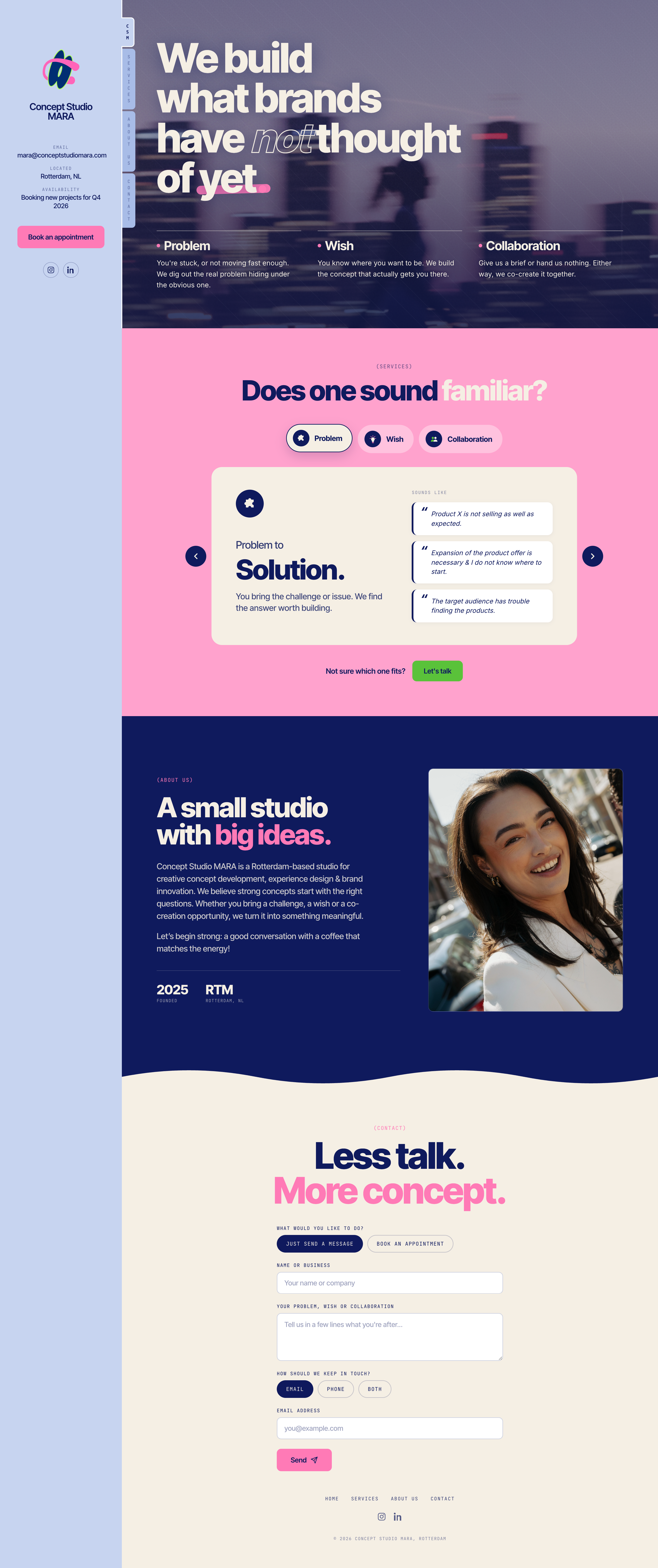
        <img src="uploads/Concept-Studio-MARA-We-build-what-brands-have-not-thought-of-yet--08-19-2026_09_37_AM.png" alt="Concept Studio MARA website"
          style={{ width: "100%", display: "block", borderRadius: 6, marginTop: 40, border: "2px solid #fff" }}/>
      </>
      }

      {id === "design-platform" &&
      <>
        <h3 style={{ fontSize: 12, letterSpacing: ".12em", textTransform: "uppercase", color: "#1A1A1C", margin: "0 0 16px", fontWeight: 700 }}>
          Case 1: AI Resizer
        </h3>

        <section className="va-case-section" style={{ display: "grid", gridTemplateColumns: "180px 1fr", gap: 32, padding: "24px 0", borderTop: "1px solid var(--line)" }}>
          <h3 style={{ fontSize: 12, letterSpacing: ".1em", textTransform: "uppercase", color: "var(--muted)", margin: 0, fontWeight: 500 }}>
            01 · {lang === "nl" ? "Doel" : "Objective"}
          </h3>
          <p style={{ fontSize: 17, lineHeight: 1.6, margin: 0 }}>
            {lang === "nl"
              ? "Template builders in staat stellen om één basislayout te ontwerpen en daar automatisch, met AI, extra formaten voor verschillende platforms van te laten genereren."
              : "Enable template builders to design a single base layout and automatically generate additional sizes for different platforms using AI."}
          </p>
        </section>

        <section className="va-case-section" style={{ display: "grid", gridTemplateColumns: "180px 1fr", gap: 32, padding: "24px 0", borderTop: "1px solid var(--line)" }}>
          <h3 style={{ fontSize: 12, letterSpacing: ".1em", textTransform: "uppercase", color: "var(--muted)", margin: 0, fontWeight: 500 }}>
            02 · {lang === "nl" ? "Aanpak" : "Approach"}
          </h3>
          <p style={{ fontSize: 17, lineHeight: 1.6, margin: 0 }}>
            {lang === "nl"
              ? "Omdat gebruikers geen inzicht hadden in wat de AI precies deed, heb ik statusontwerp toegevoegd dat het verwerken van elk formaat zichtbaar maakt. Animaties en een op AI-geïnspireerd kleurenpalet geven het proces een levendig en begrijpelijk gevoel, in plaats van een onzichtbare wachttijd."
              : "Since users had no insight into what the AI was actually doing, I added state design that makes the processing of each size visible. Animations and an AI-inspired color palette give the process a lively, understandable feel instead of an invisible wait."}
          </p>
        </section>

        <section className="va-case-section" style={{ display: "grid", gridTemplateColumns: "180px 1fr", gap: 32, padding: "24px 0", borderTop: "1px solid var(--line)" }}>
          <h3 style={{ fontSize: 12, letterSpacing: ".1em", textTransform: "uppercase", color: "var(--muted)", margin: 0, fontWeight: 500 }}>
            03 · {lang === "nl" ? "Belangrijkste inzichten" : "Learnings"}
          </h3>
          <p style={{ fontSize: 17, lineHeight: 1.6, margin: 0 }}>
            {lang === "nl"
              ? "Ik ontdekte hoe essentieel het is om AI-activiteit zichtbaar te maken via statusontwerp. Animaties en op AI-geïnspireerde kleuren hielpen het resizeproces levendig en begrijpelijk te laten aanvoelen."
              : "I discovered how essential it is to visualize AI activity through state design. Animations and AI-inspired color palettes helped make the resizing process feel alive and understandable."}
          </p>
        </section>

        <div style={{ marginTop: 48, marginBottom: 48, padding: "28px 32px", background: "#2A2A2E", color: "#fff", borderRadius: 6 }}>
          <span style={{ fontSize: 11, letterSpacing: ".12em", textTransform: "uppercase", opacity: 0.7 }}>{t.outcome_label}</span>
          <p style={{ fontFamily: "var(--serif)", fontSize: 28, lineHeight: 1.2, margin: "8px 0 0" }}>
            {lang === "nl"
              ? "Een duidelijk visueel overzicht van alle formaten die door AI geresized worden, zodat gebruikers het proces kunnen volgen of gewoon verder kunnen met andere taken terwijl het op de achtergrond afrondt."
              : "A clear visual overview of all sizes being resized by AI, letting users either watch the process or move on with other tasks while it completes in the background."}
          </p>
        </div>

        <h3 style={{ fontSize: 12, letterSpacing: ".12em", textTransform: "uppercase", color: "var(--muted)", margin: "0 0 16px", fontWeight: 500 }}>
          Result
        </h3>
        <div className="va-photo-grid" style={{ display: "grid", gridTemplateColumns: "1fr 1fr", gap: 16, marginBottom: 16 }}>
          <div>
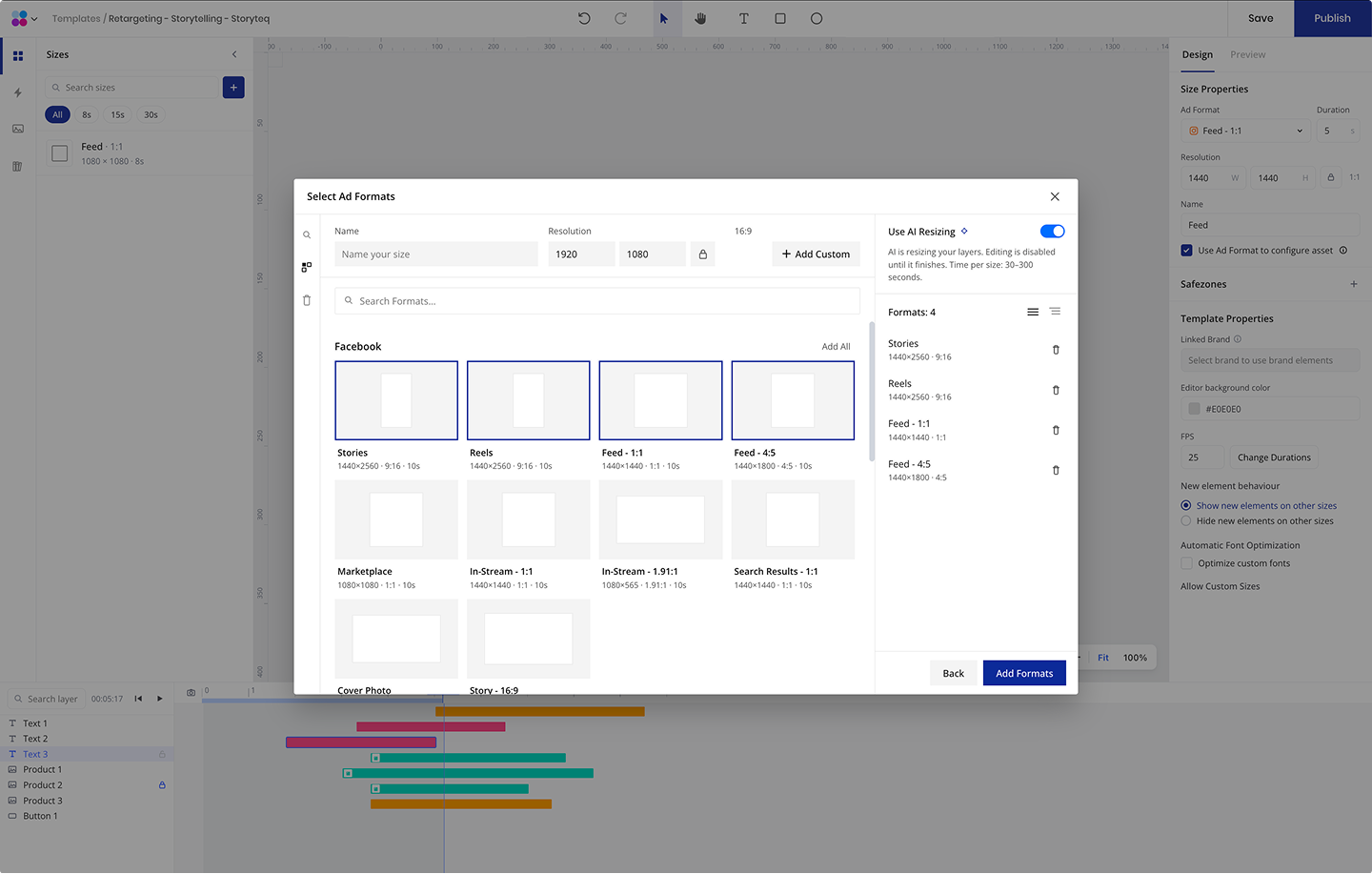
            <p style={{ fontSize: 12, color: "var(--muted)", margin: "0 0 8px" }}>Enable AI Resizer</p>
            <img src="uploads/Enable AI Resizer.png" alt="Enable AI resizing for selected formats"
              style={{ width: "100%", display: "block", borderRadius: 6 }}/>
          </div>
          <div>
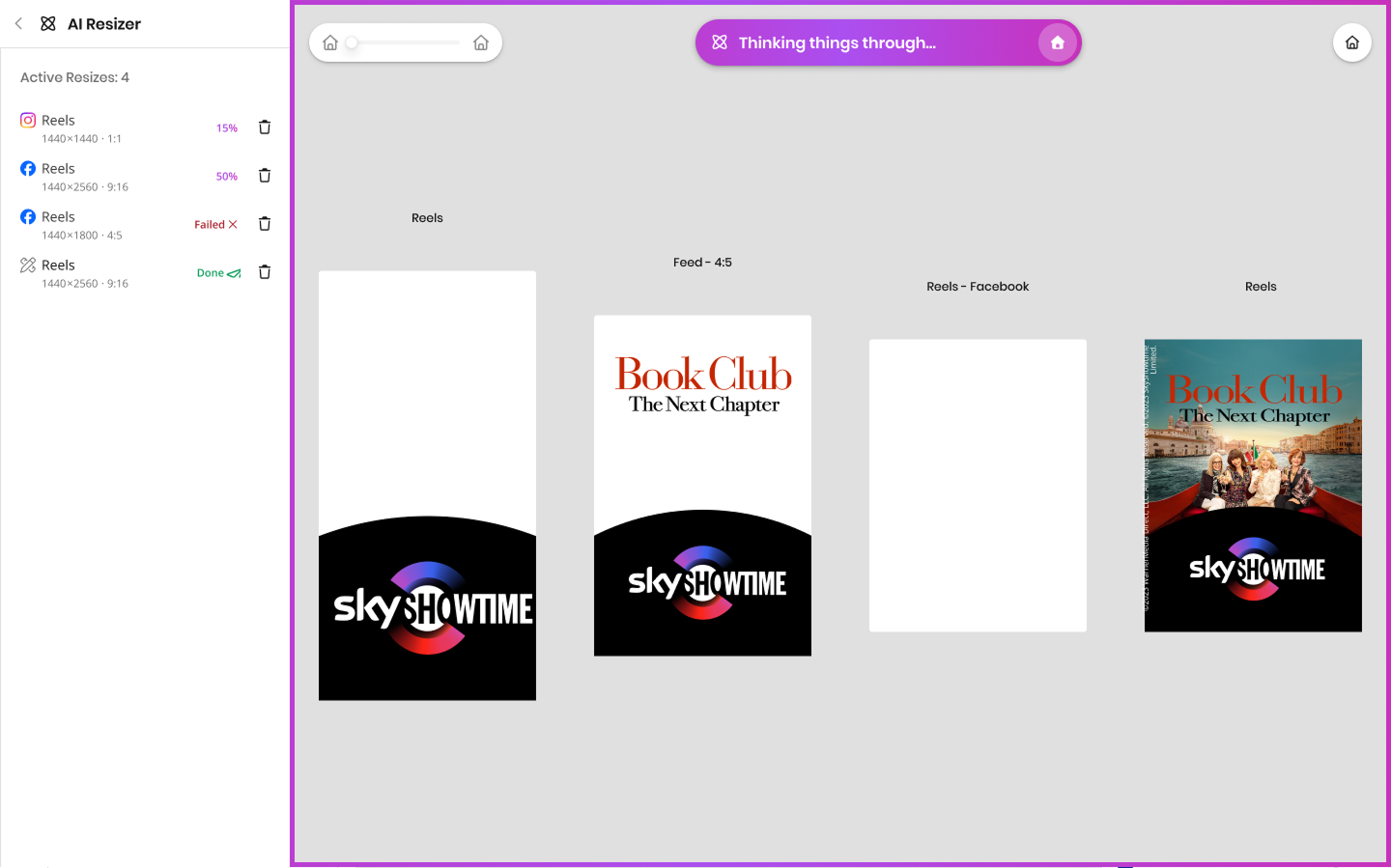
            <p style={{ fontSize: 12, color: "var(--muted)", margin: "0 0 8px" }}>Claude Design Prototype</p>
            <img src="uploads/Claude Design Prototype.png" alt="AI Resizer active resizes panel"
              style={{ width: "100%", display: "block", borderRadius: 6 }}/>
          </div>
        </div>
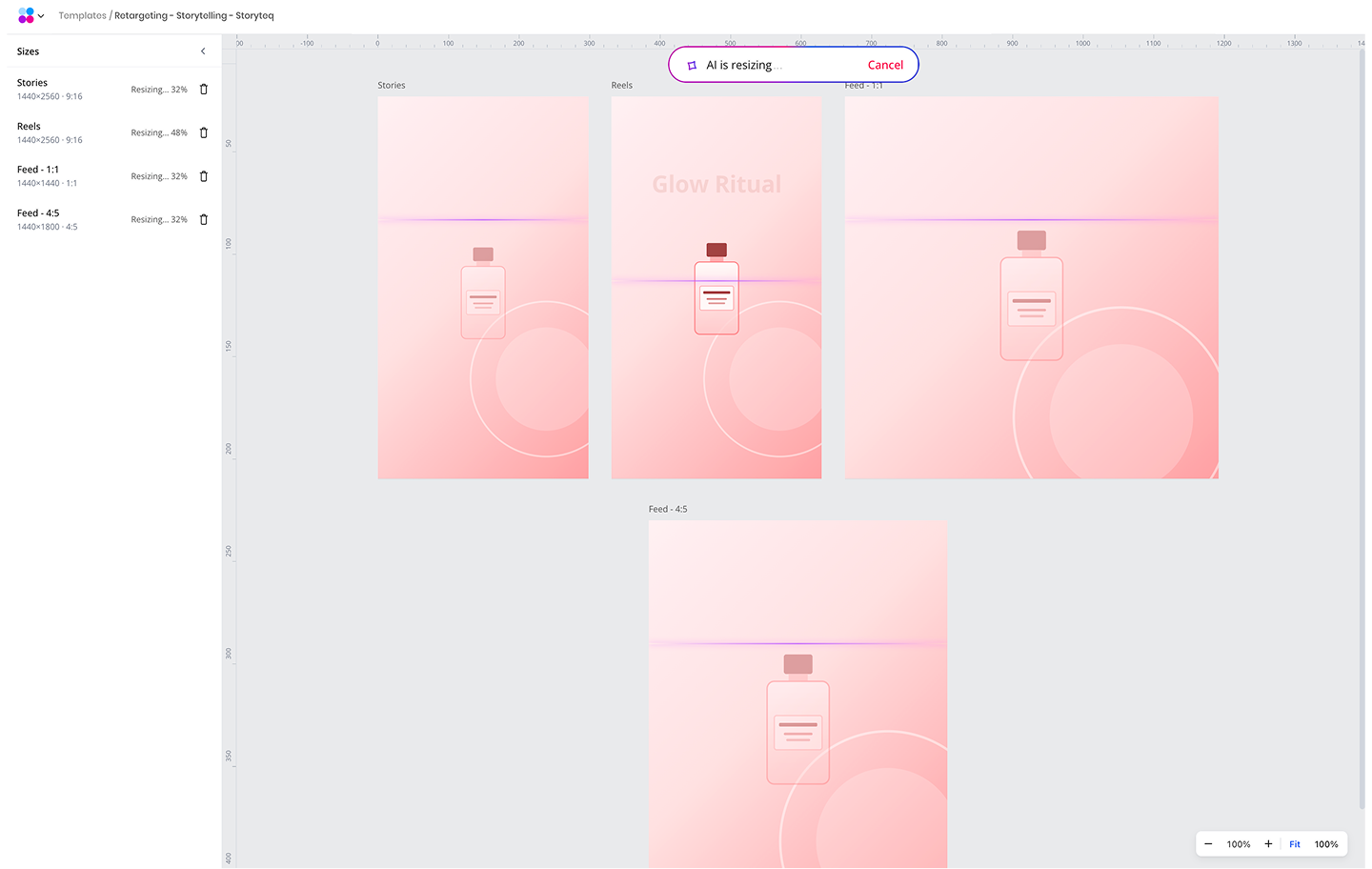
        <p style={{ fontSize: 12, color: "var(--muted)", margin: "0 0 8px" }}>AI Resizer - In progress</p>
        <img src="uploads/AI Resizer - In progress.png" alt="AI resizing multiple sizes in progress"
          style={{ width: "100%", display: "block", borderRadius: 6 }}/>

        <h3 style={{ fontSize: 12, letterSpacing: ".12em", textTransform: "uppercase", color: "#1A1A1C", margin: "56px 0 16px", fontWeight: 700 }}>
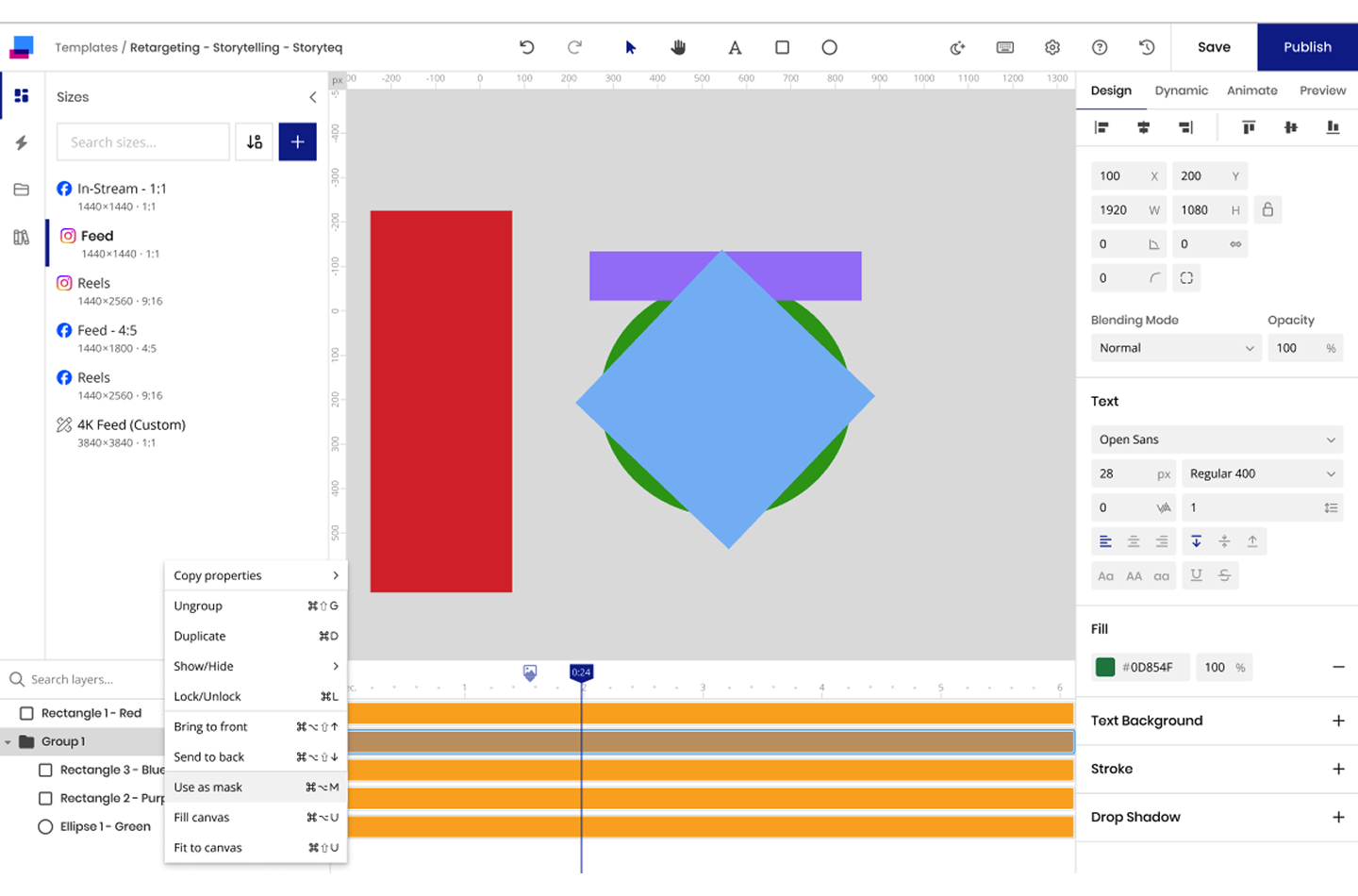
          Case 2: Masking
        </h3>

        <section className="va-case-section" style={{ display: "grid", gridTemplateColumns: "180px 1fr", gap: 32, padding: "24px 0", borderTop: "1px solid var(--line)" }}>
          <h3 style={{ fontSize: 12, letterSpacing: ".1em", textTransform: "uppercase", color: "var(--muted)", margin: 0, fontWeight: 500 }}>
            01 · {lang === "nl" ? "Doel" : "Objective"}
          </h3>
          <p style={{ fontSize: 17, lineHeight: 1.6, margin: 0 }}>
            {lang === "nl"
              ? "Gebruikers in staat stellen om te maskeren binnen de template tool, inclusief het maken en gebruiken van hun eigen aangepaste maskervormen."
              : "Enable users to apply masking within the template tool, including creating and using their own custom mask shapes."}
          </p>
        </section>

        <section className="va-case-section" style={{ display: "grid", gridTemplateColumns: "180px 1fr", gap: 32, padding: "24px 0", borderTop: "1px solid var(--line)" }}>
          <h3 style={{ fontSize: 12, letterSpacing: ".1em", textTransform: "uppercase", color: "var(--muted)", margin: 0, fontWeight: 500 }}>
            02 · {lang === "nl" ? "Aanpak" : "Approach"}
          </h3>
          <p style={{ fontSize: 17, lineHeight: 1.6, margin: 0 }}>
            {lang === "nl"
              ? "Ik heb bepaald waar maskeren past in de workflow, alle mogelijke maskeerscenario's gedefinieerd, en nauw met developers samengewerkt om te zorgen dat elk scenario zich zoals verwacht gedraagt."
              : "I identified where masking fits in the workflow, defined all possible masking scenarios, and collaborated closely with developers to ensure each case behaves as expected."}
          </p>
        </section>

        <section className="va-case-section" style={{ display: "grid", gridTemplateColumns: "180px 1fr", gap: 32, padding: "24px 0", borderTop: "1px solid var(--line)" }}>
          <h3 style={{ fontSize: 12, letterSpacing: ".1em", textTransform: "uppercase", color: "var(--muted)", margin: 0, fontWeight: 500 }}>
            03 · {lang === "nl" ? "Belangrijkste inzichten" : "Key learnings"}
          </h3>
          <p style={{ fontSize: 17, lineHeight: 1.6, margin: 0 }}>
            {lang === "nl"
              ? "Sterke communicatie en continu testen met developers waren essentieel om tot een snelle, overzichtelijke en betrouwbare implementatie te komen."
              : "Strong communication and continuous testing with developers were essential for delivering a fast, organized and reliable implementation."}
          </p>
        </section>

        <div style={{ marginTop: 48, marginBottom: 48, padding: "28px 32px", background: "#2A2A2E", color: "#fff", borderRadius: 6 }}>
          <span style={{ fontSize: 11, letterSpacing: ".12em", textTransform: "uppercase", opacity: 0.7 }}>{t.outcome_label}</span>
          <p style={{ fontFamily: "var(--serif)", fontSize: 28, lineHeight: 1.2, margin: "8px 0 0" }}>
            {lang === "nl"
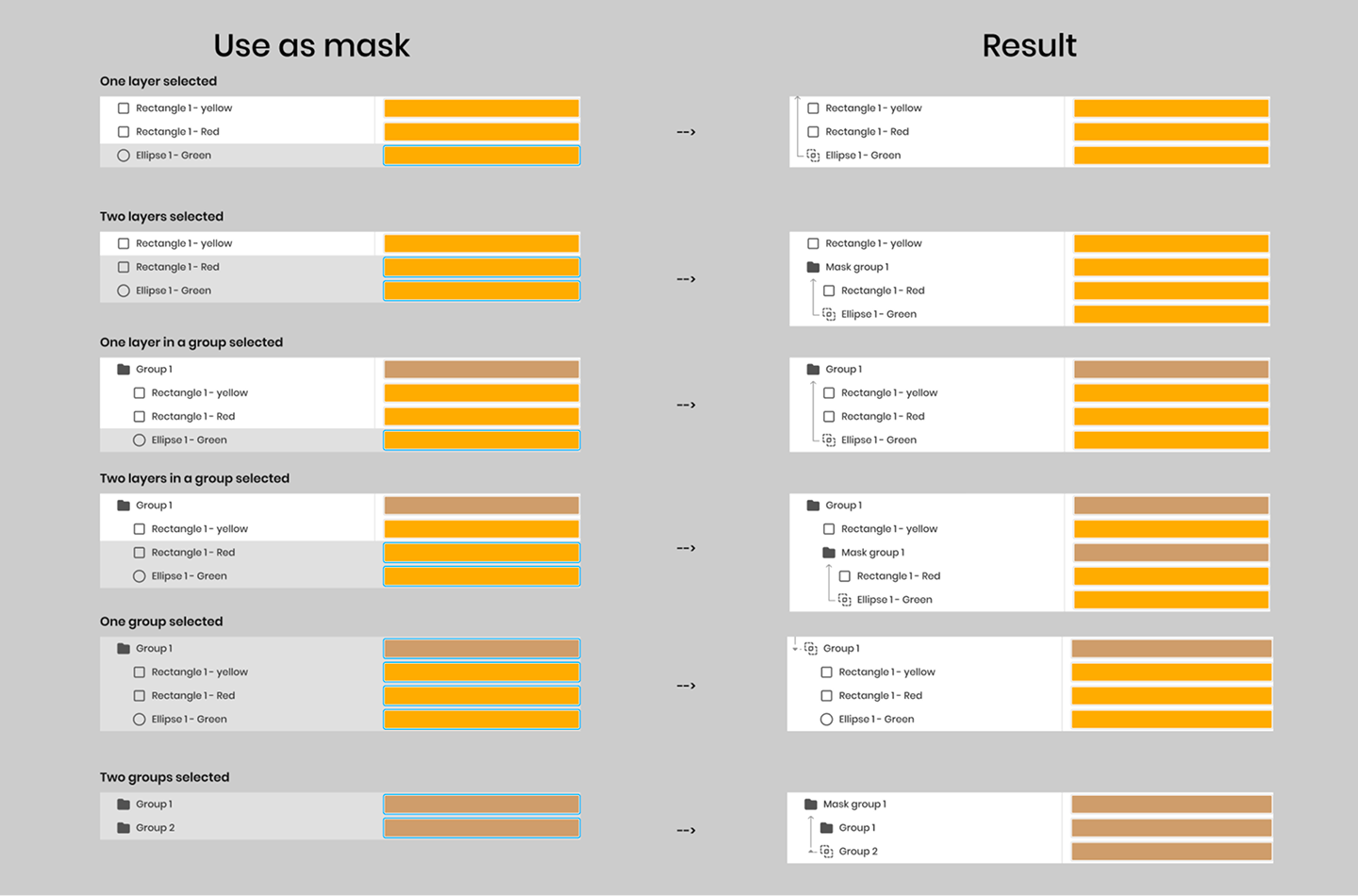
              ? "Een volledig functionerende maskeerfunctie met duidelijke visuele elementen, iconen, groepeergedrag en timeline/canvas-interacties, consistent geïmplementeerd over alle scenario's."
              : "A fully functional masking feature with clear visual elements, icons, grouping behavior and timeline/canvas interactions, implemented consistently across all scenarios."}
          </p>
        </div>

        <div className="va-photo-grid" style={{ display: "grid", gridTemplateColumns: "1fr 1fr", gap: 16, marginBottom: 16 }}>
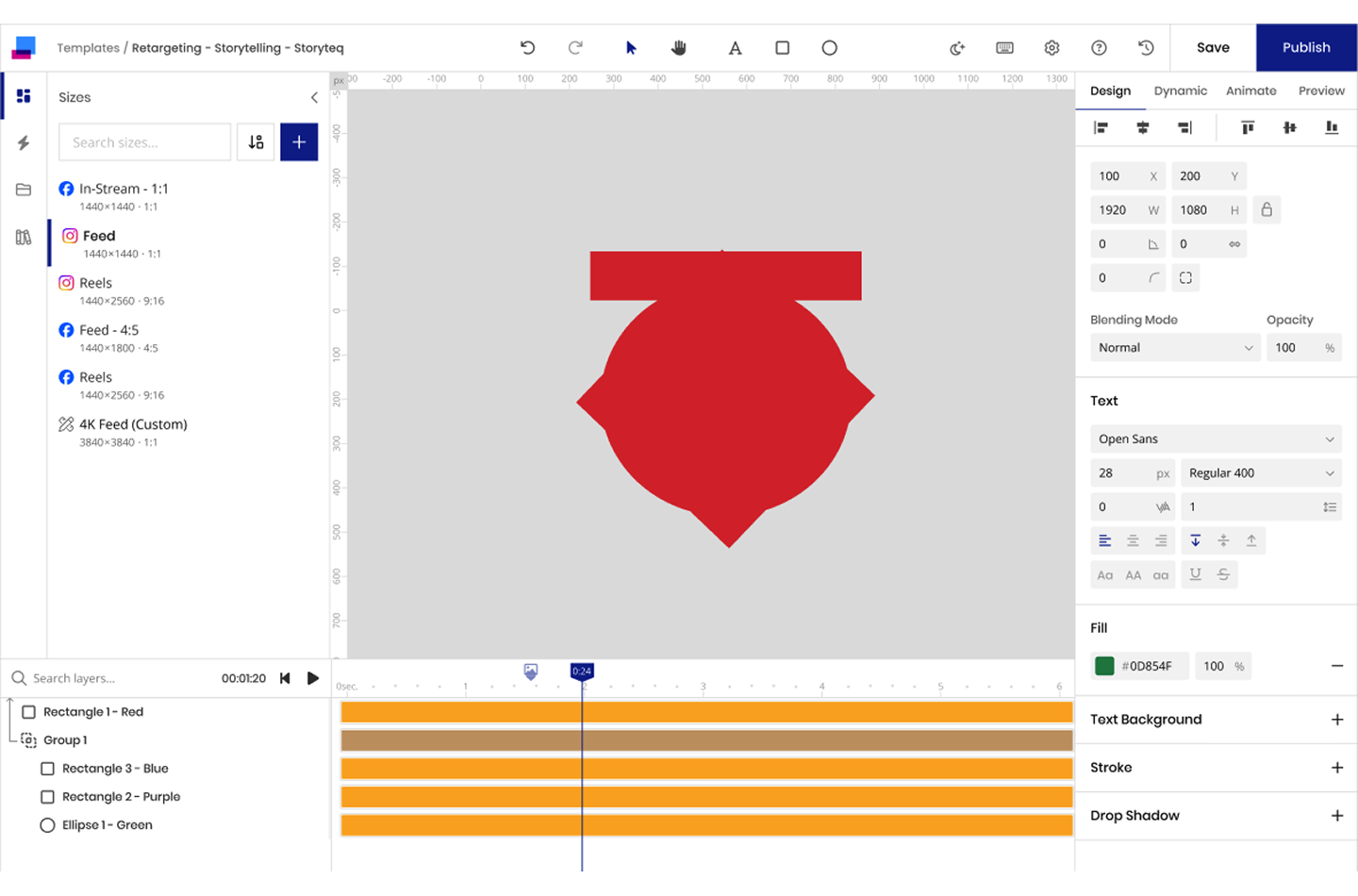
          <img src="uploads/Group 11.png" alt="Use as mask — before masking"
            style={{ width: "100%", display: "block", borderRadius: 6 }}/>
          <img src="uploads/Group 12.png" alt="Use as mask — result"
            style={{ width: "100%", display: "block", borderRadius: 6 }}/>
        </div>
        <img src="uploads/Group 13.png" alt="Use as mask — selection scenarios and results"
          style={{ width: "100%", display: "block", borderRadius: 6 }}/>
      </>
      }

      {id === "cms-24" &&
      <>
        <h3 style={{ fontSize: 12, letterSpacing: ".12em", textTransform: "uppercase", color: "#1A1A1C", margin: "0 0 16px", fontWeight: 700 }}>
          Case 1: Price agreement
        </h3>

        <section className="va-case-section" style={{ display: "grid", gridTemplateColumns: "180px 1fr", gap: 32, padding: "24px 0", borderTop: "1px solid var(--line)" }}>
          <h3 style={{ fontSize: 12, letterSpacing: ".1em", textTransform: "uppercase", color: "var(--muted)", margin: 0, fontWeight: 500 }}>
            01 · {lang === "nl" ? "Doel" : "Objective"}
          </h3>
          <p style={{ fontSize: 17, lineHeight: 1.6, margin: 0 }}>
            {lang === "nl"
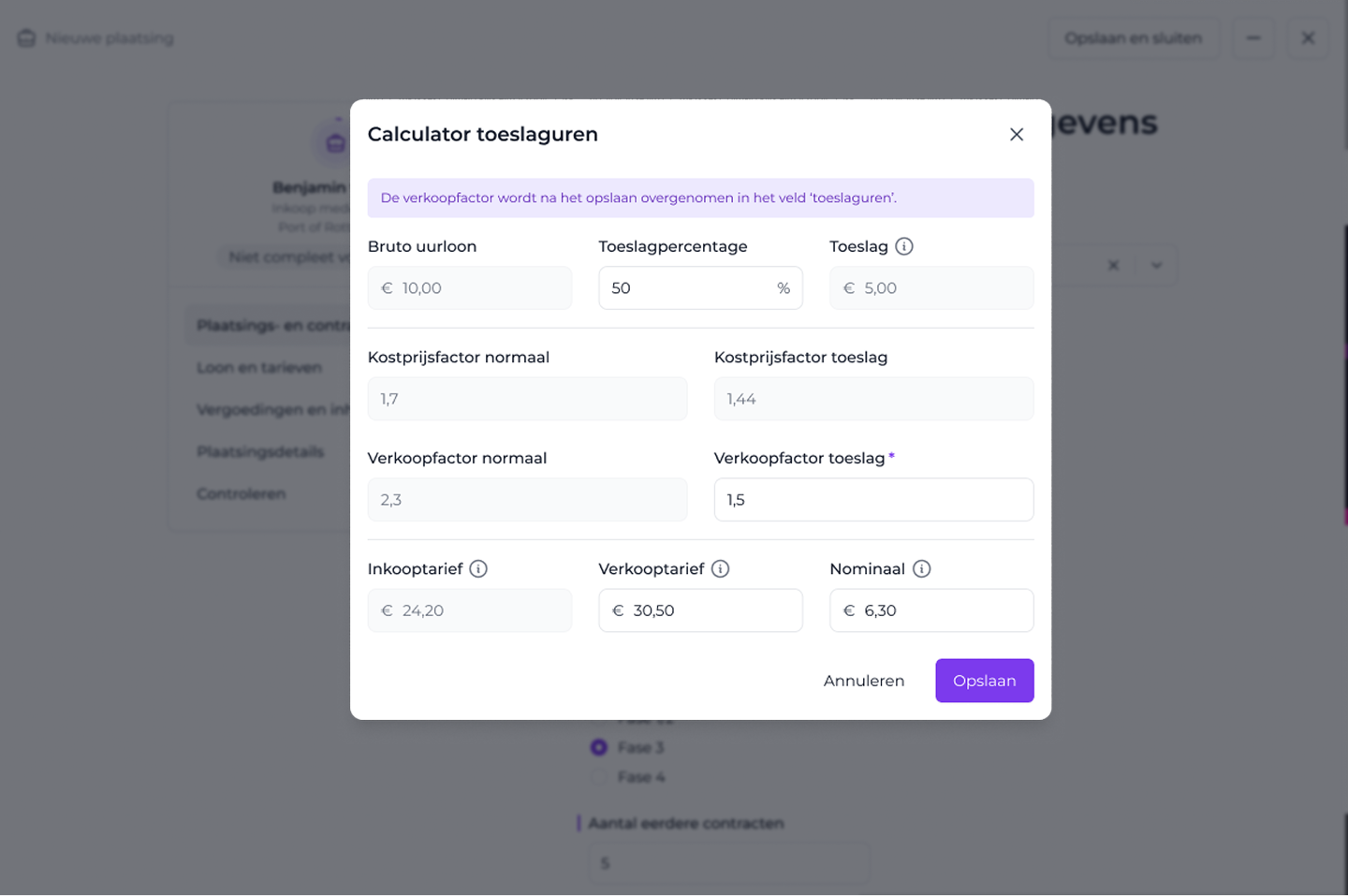
              ? "Een complexe calculator maken die gebruikers helpt een nauwkeurig verkooptarief te bepalen."
              : "Create a complex calculator that helps users determine an accurate sales rate."}
          </p>
        </section>

        <section className="va-case-section" style={{ display: "grid", gridTemplateColumns: "180px 1fr", gap: 32, padding: "24px 0", borderTop: "1px solid var(--line)" }}>
          <h3 style={{ fontSize: 12, letterSpacing: ".1em", textTransform: "uppercase", color: "var(--muted)", margin: 0, fontWeight: 500 }}>
            02 · {lang === "nl" ? "Verbeteringen" : "Improvements"}
          </h3>
          <p style={{ fontSize: 17, lineHeight: 1.6, margin: 0 }}>
            {lang === "nl"
              ? "Ik heb de calculator ontworpen en gestructureerd om meerdere variabelen en logica-paden aan te kunnen, zodat de ervaring ondanks de complexiteit duidelijk en bruikbaar bleef."
              : "I designed and structured the calculator to handle multiple variables and logic paths, making the experience clear and usable despite the complexity."}
          </p>
        </section>

        <section className="va-case-section" style={{ display: "grid", gridTemplateColumns: "180px 1fr", gap: 32, padding: "24px 0", borderTop: "1px solid var(--line)" }}>
          <h3 style={{ fontSize: 12, letterSpacing: ".1em", textTransform: "uppercase", color: "var(--muted)", margin: 0, fontWeight: 500 }}>
            03 · {lang === "nl" ? "Belangrijkste inzichten" : "Key learnings"}
          </h3>
          <p style={{ fontSize: 17, lineHeight: 1.6, margin: 0 }}>
            {lang === "nl"
              ? "Een functionele, gebruiksvriendelijke calculator die een lastig proces vereenvoudigt, en een type uitdaging dat me energie geeft en waarbij ik diep in het probleemoplossen kan duiken."
              : "A functional, user-friendly calculator that simplifies a difficult process, and a type of challenge that energizes me and lets me dive deep into problem-solving."}
          </p>
        </section>

        <div style={{ marginTop: 48, marginBottom: 48, padding: "28px 32px", background: "#5E3B8A", color: "#fff", borderRadius: 6 }}>
          <span style={{ fontSize: 11, letterSpacing: ".12em", textTransform: "uppercase", opacity: 0.7 }}>{t.outcome_label}</span>
          <p style={{ fontFamily: "var(--serif)", fontSize: 28, lineHeight: 1.2, margin: "8px 0 0" }}>
            {lang === "nl"
              ? "Een duidelijkere prijsafspraak-flow gebouwd met een calculator voor toeslagen, zodat gebruikers sneller en met minder fouten tarieven konden vaststellen."
              : "Built a clearer price agreement flow with a surcharge calculator, so users could set rates faster and with fewer mistakes."}
          </p>
        </div>

        <div className="va-photo-grid" style={{ display: "grid", gridTemplateColumns: "1fr 1fr", gap: 16 }}>
          <img src="uploads/Group 643.png" alt="Price agreement — contract details"
            style={{ width: "100%", display: "block", borderRadius: 6 }}/>
          <img src="uploads/Group 9-1f9d9709.png" alt="Price agreement — surcharge calculator"
            style={{ width: "100%", display: "block", borderRadius: 6 }}/>
        </div>

        {/* Placement overview */}
        <h3 style={{ fontSize: 12, letterSpacing: ".12em", textTransform: "uppercase", color: "#1A1A1C", margin: "56px 0 16px", fontWeight: 700 }}>
          Case 2: Placement overview
        </h3>

        <section className="va-case-section" style={{ display: "grid", gridTemplateColumns: "180px 1fr", gap: 32, padding: "24px 0", borderTop: "1px solid var(--line)" }}>
          <h3 style={{ fontSize: 12, letterSpacing: ".1em", textTransform: "uppercase", color: "var(--muted)", margin: 0, fontWeight: 500 }}>
            01 · {lang === "nl" ? "Het probleem" : "The problem"}
          </h3>
          <p style={{ fontSize: 17, lineHeight: 1.6, margin: 0 }}>
            {lang === "nl"
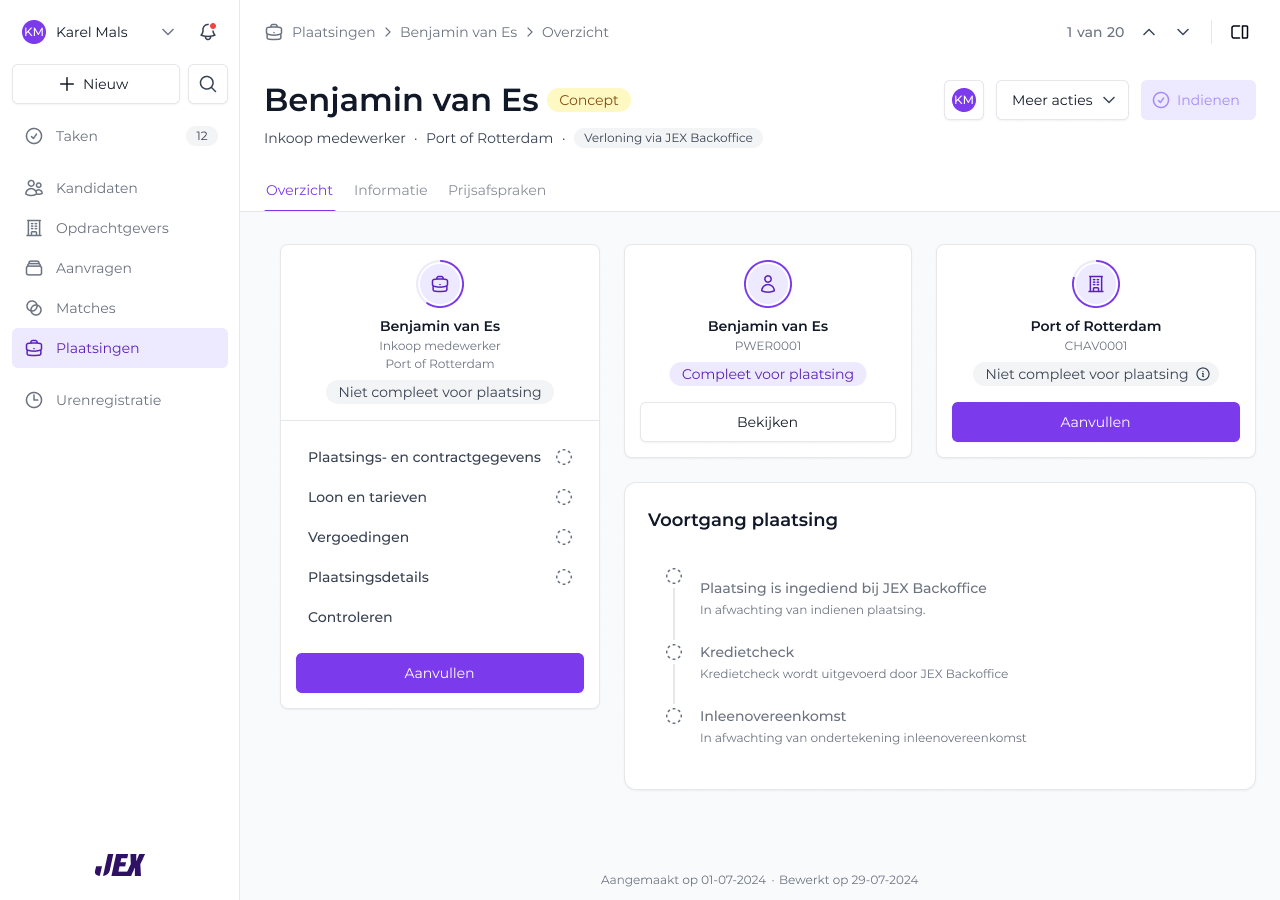
              ? "Een plaatsing bestaat uit meerdere onderdelen, een persoon, een opdrachtgever en een functie, maar die waren verspreid over losse pagina's. Er was geen centrale plek om overzicht te houden, en het compleet maken van een plaatsing kan meerdere dagen duren voordat contracten getekend en details geregeld zijn."
              : "A placement consists of multiple parts, a person, a client and a job, but these were spread across separate pages. There was no central place to keep an overview, and completing a placement can take several days before contracts are signed and details are arranged."}
          </p>
        </section>

        <section className="va-case-section" style={{ display: "grid", gridTemplateColumns: "180px 1fr", gap: 32, padding: "24px 0", borderTop: "1px solid var(--line)" }}>
          <h3 style={{ fontSize: 12, letterSpacing: ".1em", textTransform: "uppercase", color: "var(--muted)", margin: 0, fontWeight: 500 }}>
            02 · {lang === "nl" ? "Oplossing" : "Solution"}
          </h3>
          <p style={{ fontSize: 17, lineHeight: 1.6, margin: 0 }}>
            {lang === "nl"
              ? "Ik heb één centrale plek gebouwd waar de persoon, opdrachtgever en functie samen te zien zijn, met directe doorlinks naar de bijbehorende pagina's. Zo krijgen gebruikers een beter beeld van de plaatsing en de onderdelen."
              : "I built one central place that shows the person, client and job together, with direct links through to their respective pages. This gives users a better view of the placement and its parts."}
          </p>
        </section>

        <section className="va-case-section" style={{ display: "grid", gridTemplateColumns: "180px 1fr", gap: 32, padding: "24px 0", borderTop: "1px solid var(--line)" }}>
          <h3 style={{ fontSize: 12, letterSpacing: ".1em", textTransform: "uppercase", color: "var(--muted)", margin: 0, fontWeight: 500 }}>
            03 · {lang === "nl" ? "Verbeteringen" : "Improvements"}
          </h3>
          <p style={{ fontSize: 17, lineHeight: 1.6, margin: 0 }}>
            {lang === "nl"
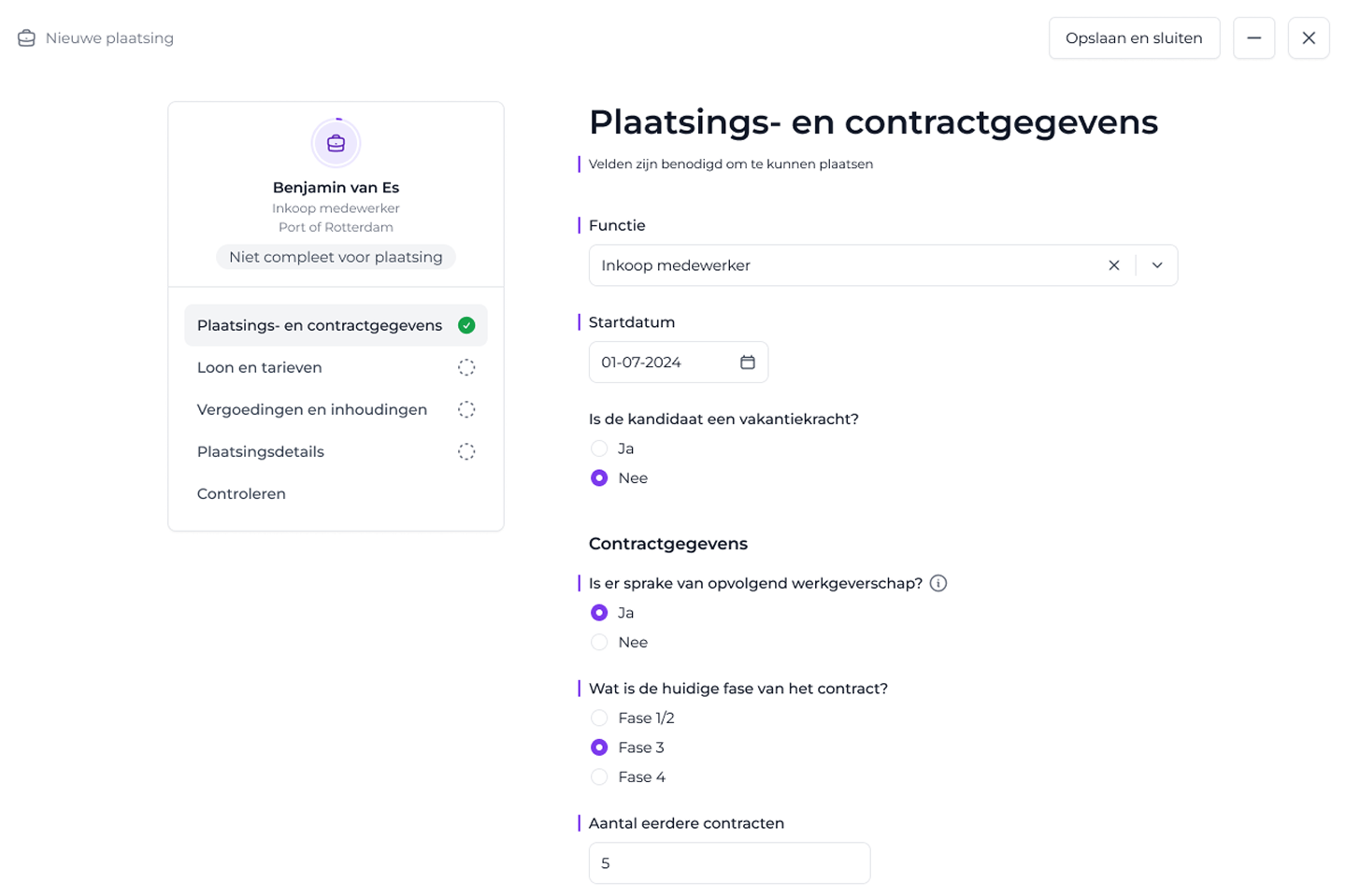
              ? "Ik heb een ingebouwde checklist toegevoegd, zodat gebruikers precies zien wat er nog geregeld moet worden om een plaatsing compleet te maken."
              : "I added a built-in checklist, so users can see exactly what still needs to be handled to complete a placement."}
          </p>
        </section>

        <div style={{ marginTop: 48, marginBottom: 48, padding: "28px 32px", background: "#5E3B8A", color: "#fff", borderRadius: 6 }}>
          <span style={{ fontSize: 11, letterSpacing: ".12em", textTransform: "uppercase", opacity: 0.7 }}>{t.outcome_label}</span>
          <p style={{ fontFamily: "var(--serif)", fontSize: 28, lineHeight: 1.2, margin: "8px 0 0" }}>
            {lang === "nl"
              ? "Eén centraal plaatsingsoverzicht met directe doorlinks en een checklist, zodat gebruikers overzicht houden en zien wat er nog nodig is om een plaatsing compleet te maken."
              : "One central placement overview with direct links and a checklist, so users keep an overview and see what's still needed to complete a placement."}
          </p>
        </div>

        <div className="va-photo-grid" style={{ display: "grid", gridTemplateColumns: "1fr 1fr", gap: 16 }}>
          <img src="uploads/Placement - Overview - Not complete.png" alt="Placement overview with checklist"
            style={{ width: "100%", display: "block", borderRadius: 6 }}/>
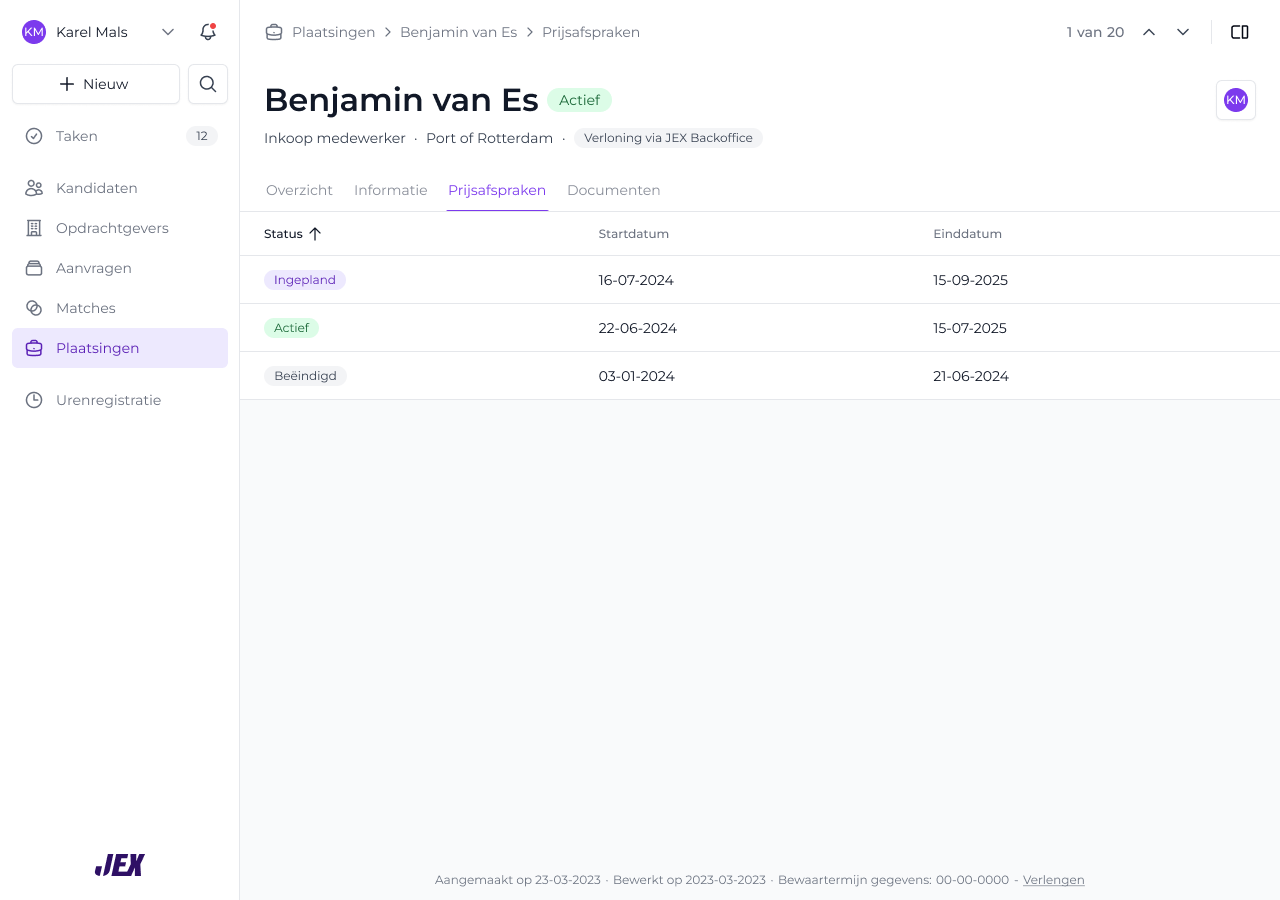
          <img src="uploads/Plaatsingen - Price agreements.png" alt="Placement price agreements list"
            style={{ width: "100%", display: "block", borderRadius: 6 }}/>
        </div>
      </>
      }

      {id === "dam-25" &&
      <>
      <h3 style={{ fontSize: 12, letterSpacing: ".12em", textTransform: "uppercase", color: "#1A1A1C", margin: "0 0 16px", fontWeight: 700 }}>
        Case 1: CAP
      </h3>
      <section className="va-case-section" style={{ display: "grid", gridTemplateColumns: "180px 1fr", gap: 32, padding: "24px 0", borderTop: "1px solid var(--line)", marginTop: 0 }}>
        <h3 style={{ fontSize: 12, letterSpacing: ".1em", textTransform: "uppercase", color: "var(--muted)", margin: 0, fontWeight: 500 }}>
          01 - SUBJECT
        </h3>
        <p style={{ fontSize: 17, lineHeight: 1.6, margin: 0 }}>
          {lang === "nl"
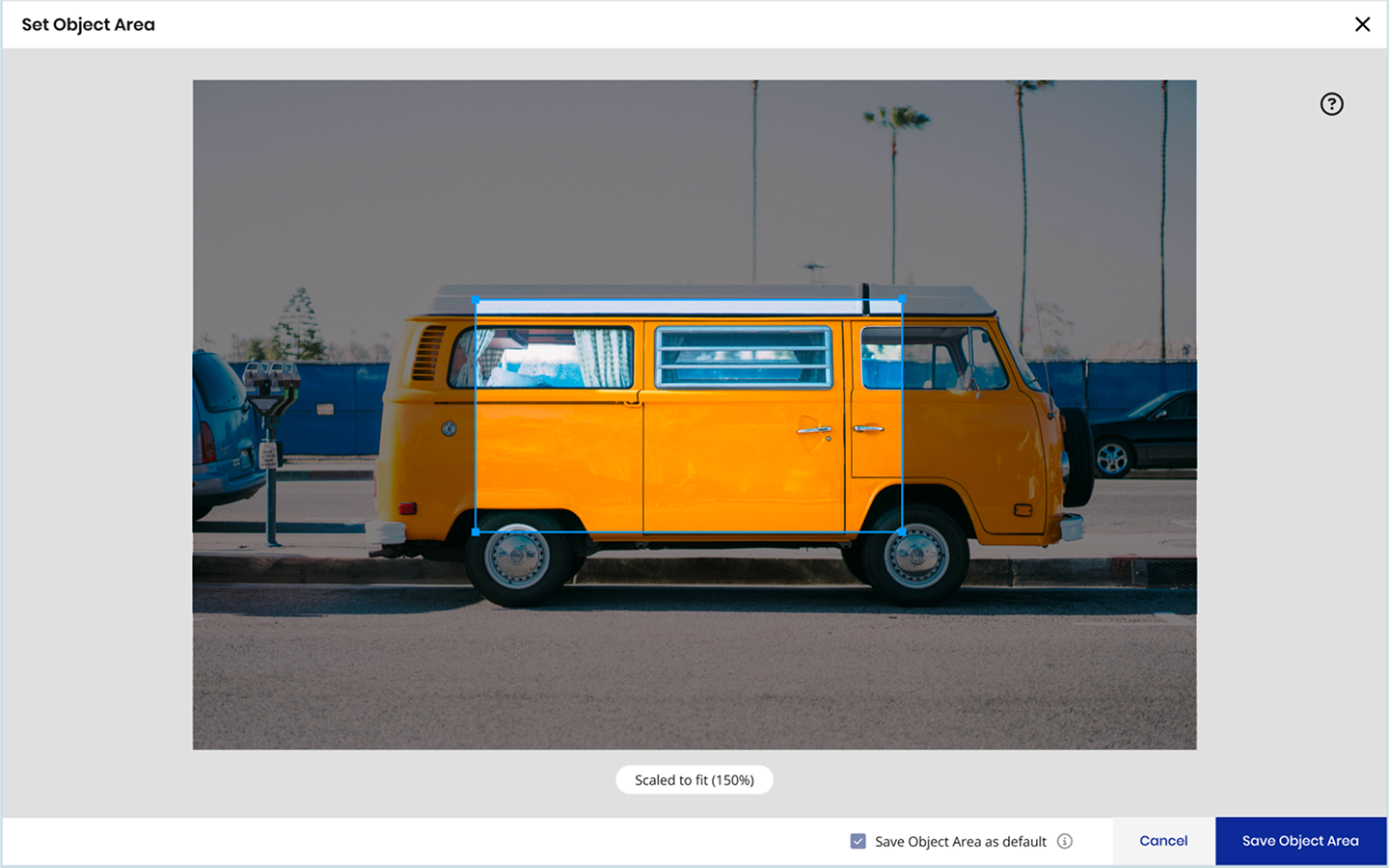
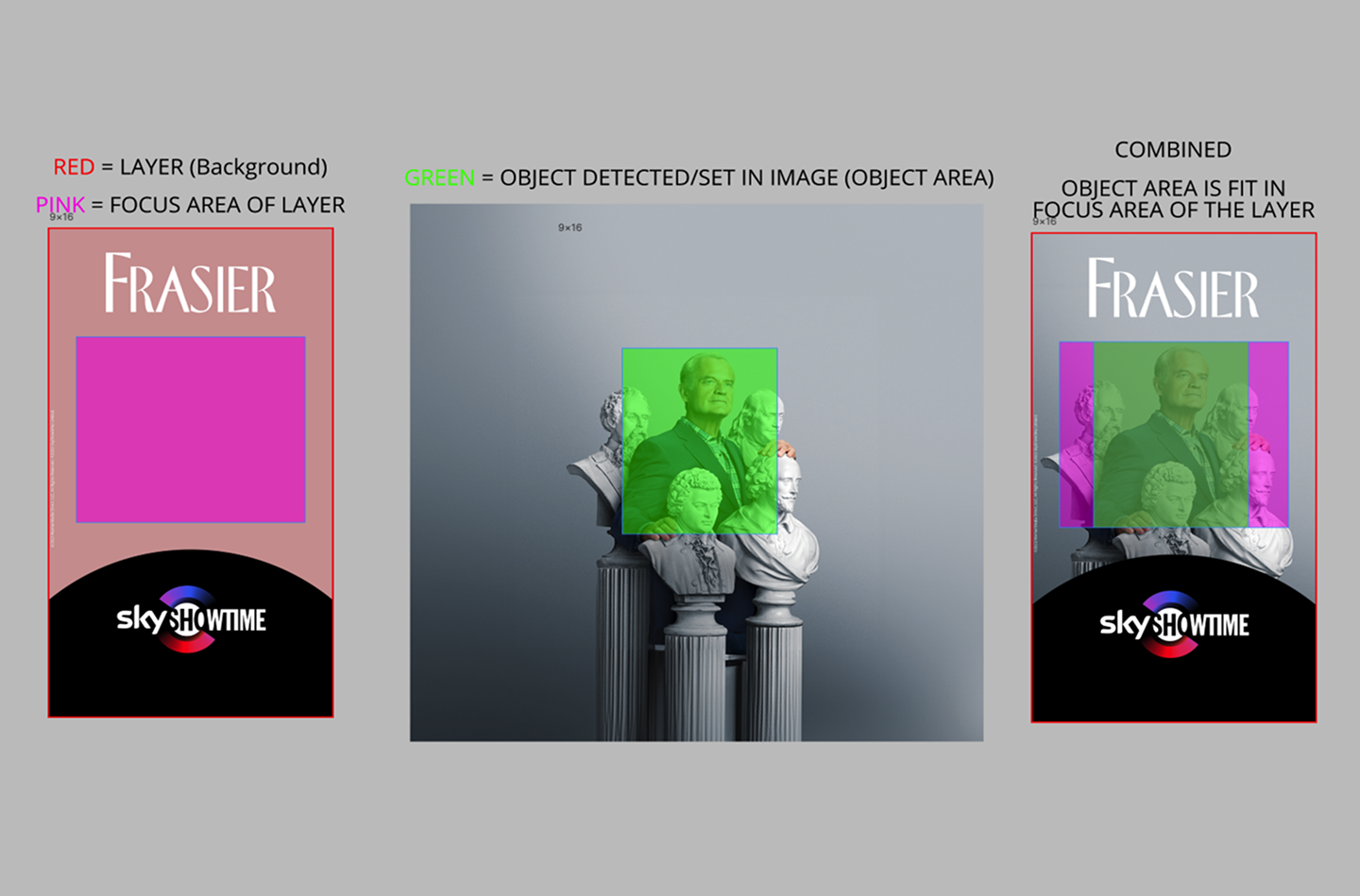
            ? "Object Area (OA) en Content-Aware Positioning (CAP) zijn features die het voor gebruikers makkelijker maken om afbeeldingen binnen hun ontwerp te positioneren. OA detecteert het hoofdonderwerp, terwijl CAP elementen plaatst in gebieden die geen belangrijke content bedekken, zodat visuals helder en goed gebalanceerd blijven."
            : "Object Area (OA) and Content-Aware Positioning (CAP) are features that make it easier for users to position images inside their design. OA detects the main subject, while CAP places elements in areas that don't cover important content, helping users keep their visuals clear and well-balanced."}
        </p>
      </section>

      <section className="va-case-section" style={{ display: "grid", gridTemplateColumns: "180px 1fr", gap: 32, padding: "24px 0", borderTop: "1px solid var(--line)" }}>
        <h3 style={{ fontSize: 12, letterSpacing: ".1em", textTransform: "uppercase", color: "var(--muted)", margin: 0, fontWeight: 500 }}>
          02 · {lang === "nl" ? "Doel" : "Objective"}
        </h3>
        <p style={{ fontSize: 17, lineHeight: 1.6, margin: 0 }}>
          {lang === "nl"
            ? "Gebruikers in staat stellen zelf een object area te bepalen, zodat afbeeldingen over verschillende formaten en contentgroottes altijd correct gefocust blijven."
            : "Allow users to manually define an object area so images always stay correctly focused across different formats and content sizes."}
        </p>
      </section>

      <section className="va-case-section" style={{ display: "grid", gridTemplateColumns: "180px 1fr", gap: 32, padding: "24px 0", borderTop: "1px solid var(--line)" }}>
        <h3 style={{ fontSize: 12, letterSpacing: ".1em", textTransform: "uppercase", color: "var(--muted)", margin: 0, fontWeight: 500 }}>
          03 · {lang === "nl" ? "Aanpak" : "Approach"}
        </h3>
        <p style={{ fontSize: 17, lineHeight: 1.6, margin: 0 }}>
          {lang === "nl"
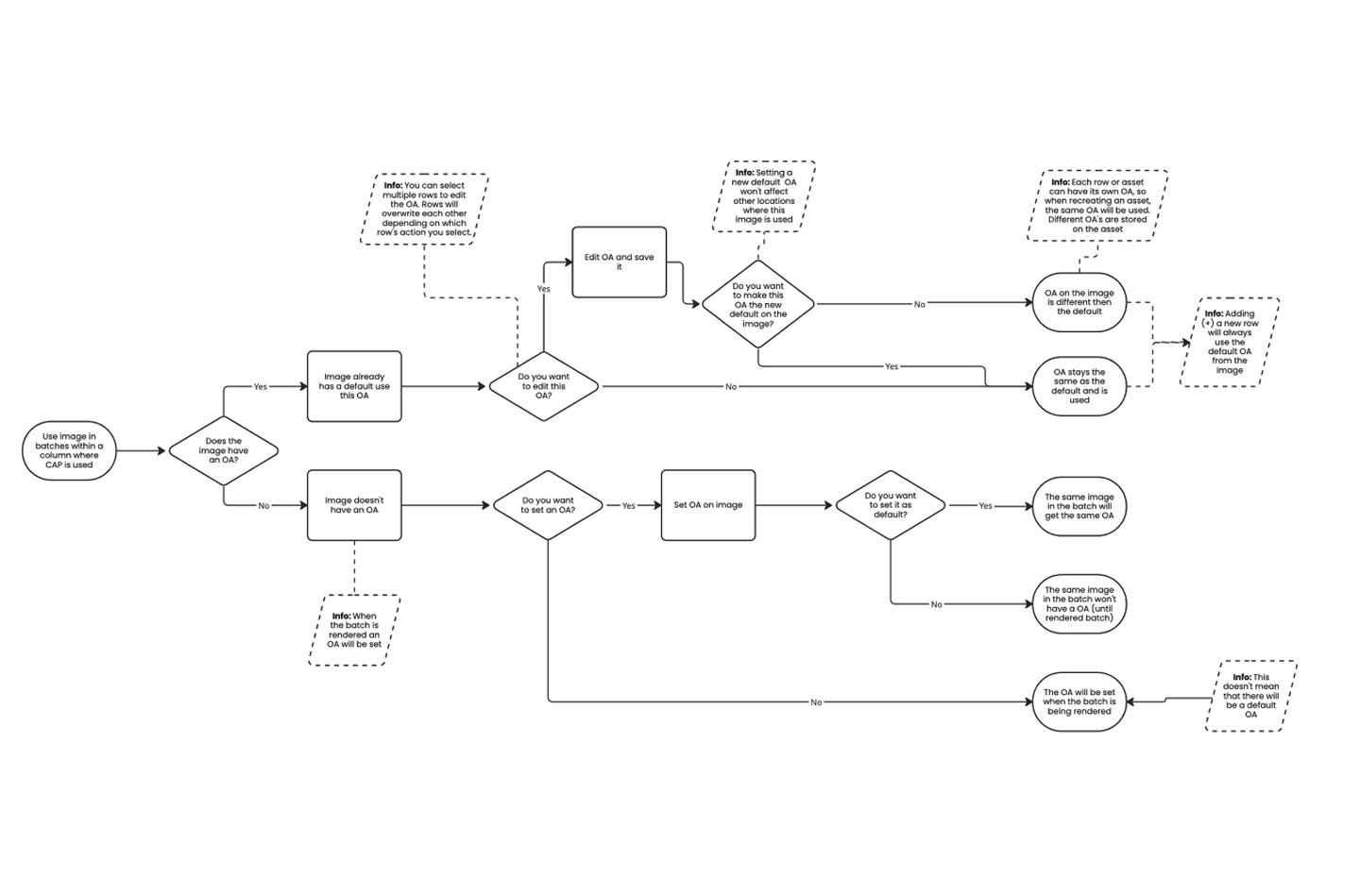
            ? "Alle scenario's in kaart gebracht waarin de object area ingesteld of aangepast kan worden, en flows ontworpen die deze variaties consistent afhandelen binnen de tool."
            : "Mapped out all scenarios where the object area could be set or updated, and designed flows that handle these variations consistently across the tool."}
        </p>
      </section>

      <section className="va-case-section" style={{ display: "grid", gridTemplateColumns: "180px 1fr", gap: 32, padding: "24px 0", borderTop: "1px solid var(--line)" }}>
        <h3 style={{ fontSize: 12, letterSpacing: ".1em", textTransform: "uppercase", color: "var(--muted)", margin: 0, fontWeight: 500 }}>
          04 · {lang === "nl" ? "Belangrijkste inzichten" : "Key learnings"}
        </h3>
        <p style={{ fontSize: 17, lineHeight: 1.6, margin: 0 }}>
          {lang === "nl"
            ? "Deze feature vroeg om diepgaand technisch begrip, niet alleen design. Nauw samenwerken met developers hielp me een oplossing vorm te geven die zowel bruikbaar als technisch solide was."
            : "This feature required deep technical understanding, not just design. Collaborating closely with developers helped me shape a solution that was both usable and technically sound."}
        </p>
      </section>

      <div style={{ marginTop: 48, marginBottom: 48, padding: "28px 32px", background: "#2B2F3A", color: "#fff", borderRadius: 6 }}>
        <span style={{ fontSize: 11, letterSpacing: ".12em", textTransform: "uppercase", opacity: 0.7 }}>{t.outcome_label}</span>
        <p style={{ fontFamily: "var(--serif)", fontSize: 26, lineHeight: 1.25, margin: "8px 0 0" }}>
          {lang === "nl"
            ? "Een compleet stel flows dat elk mogelijk geval afdekt, zodat de object area zich voorspelbaar gedraagt en in alle formaten het juiste resultaat oplevert."
            : "A complete set of flows covering every possible case, ensuring the object area behaves predictably and delivers the right result in all formats."}
        </p>
      </div>

      <div className="va-photo-grid" style={{ display: "grid", gridTemplateColumns: "1fr 1fr", gap: 16, marginBottom: 16 }}>
        <img src="uploads/2 14-1.png" alt="Object Area — layer, focus area, combined"
          style={{ width: "100%", display: "block", borderRadius: 6 }}/>
        <img src="uploads/2 14-2.png" alt="Set Object Area modal"
          style={{ width: "100%", display: "block", borderRadius: 6 }}/>
      </div>
      <div className="va-photo-grid" style={{ display: "grid", gridTemplateColumns: "1fr 1fr", gap: 16 }}>
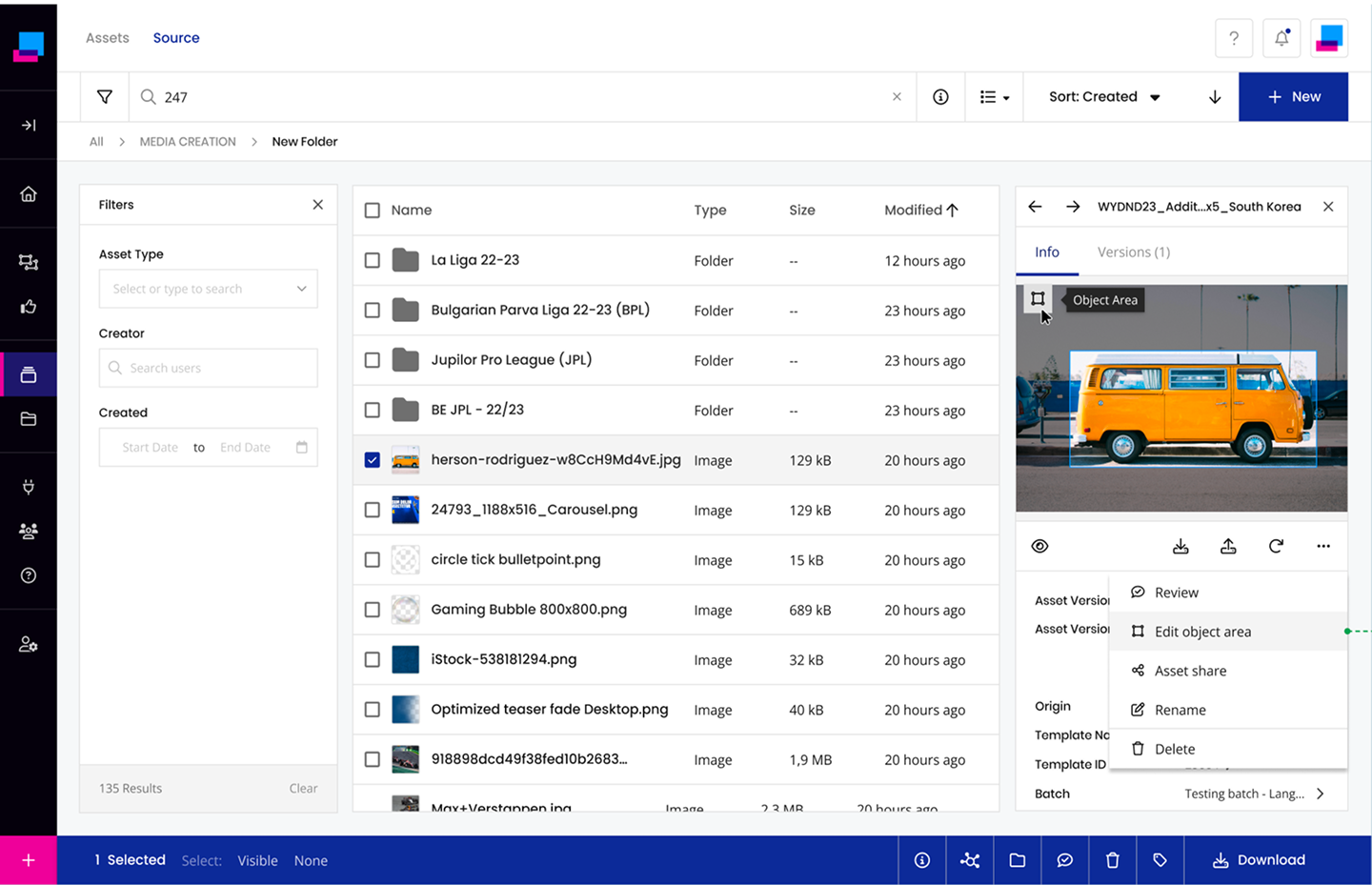
        <img src="uploads/2 14-3.png" alt="Edit object area from asset detail panel"
          style={{ width: "100%", display: "block", borderRadius: 6 }}/>
        <img src="uploads/2 14.png" alt="Object Area decision flow"
          style={{ width: "100%", display: "block", borderRadius: 6 }}/>
      </div>

      {/* Availability */}
      <h3 style={{ fontSize: 12, letterSpacing: ".12em", textTransform: "uppercase", color: "#1A1A1C", margin: "56px 0 16px", fontWeight: 700 }}>
        Case 2: Availability
      </h3>

      <section className="va-case-section" style={{ display: "grid", gridTemplateColumns: "180px 1fr", gap: 32, padding: "24px 0", borderTop: "1px solid var(--line)" }}>
        <h3 style={{ fontSize: 12, letterSpacing: ".1em", textTransform: "uppercase", color: "var(--muted)", margin: 0, fontWeight: 500 }}>
          01 · {lang === "nl" ? "Het probleem" : "The problem"}
        </h3>
        <p style={{ fontSize: 17, lineHeight: 1.6, margin: 0 }}>
          {lang === "nl"
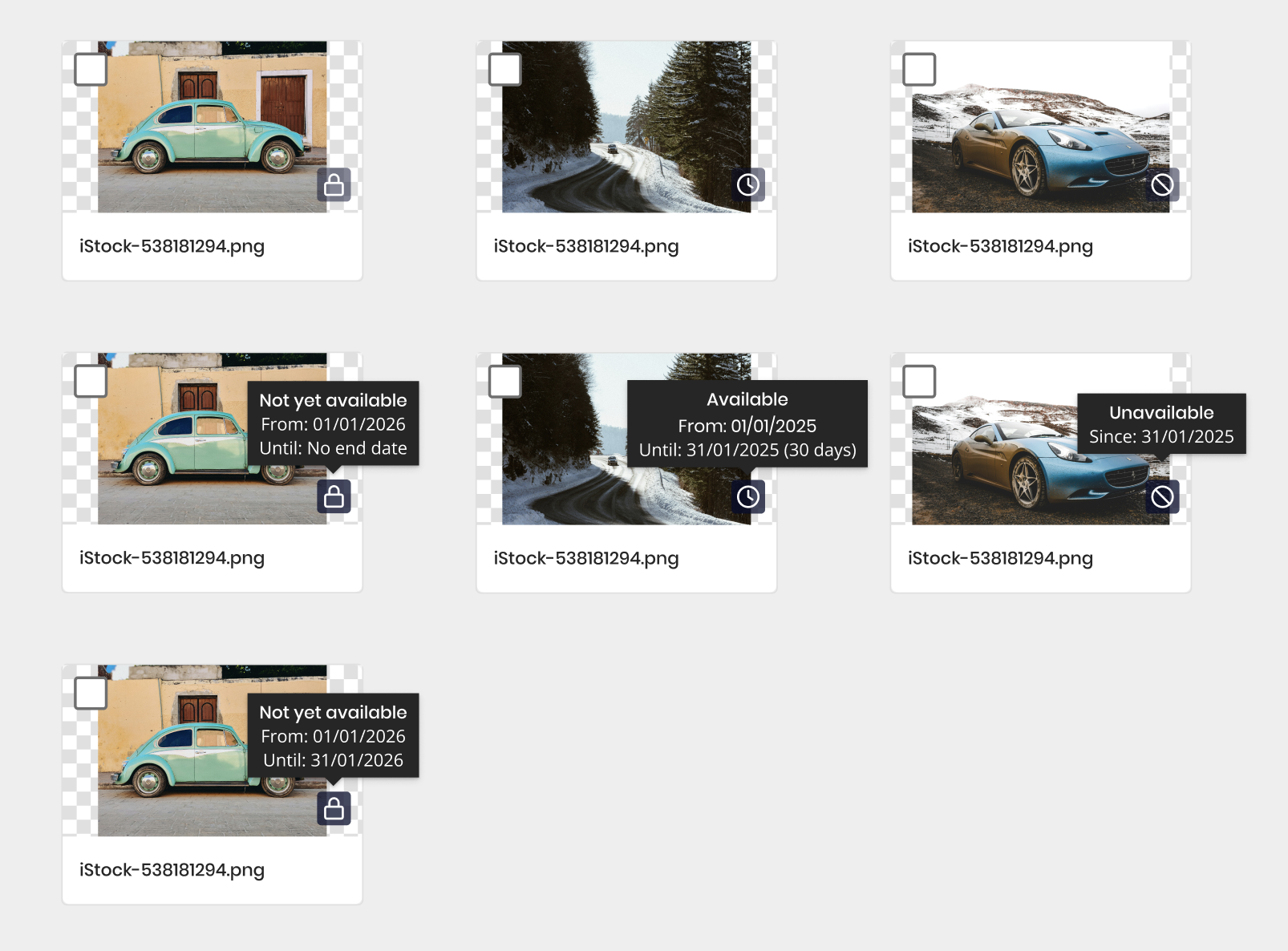
            ? "Gebruikers vroegen om beschikbaarheid op assets. Als een marketingcampagne eindigde, konden marketeers nog altijd assets blijven gebruiken die eigenlijk niet meer bruikbaar waren, en er was ook geen manier om een asset pas vanaf een specifieke datum beschikbaar te maken."
            : "Users asked for availability on assets. When a marketing campaign ended, marketeers could still use assets that were no longer supposed to be usable, and there was also no way to make an asset available only from a specific date."}
        </p>
      </section>

      <section className="va-case-section" style={{ display: "grid", gridTemplateColumns: "180px 1fr", gap: 32, padding: "24px 0", borderTop: "1px solid var(--line)" }}>
        <h3 style={{ fontSize: 12, letterSpacing: ".1em", textTransform: "uppercase", color: "var(--muted)", margin: 0, fontWeight: 500 }}>
          02 · {lang === "nl" ? "Oplossing" : "Solution"}
        </h3>
        <p style={{ fontSize: 17, lineHeight: 1.6, margin: 0 }}>
          {lang === "nl"
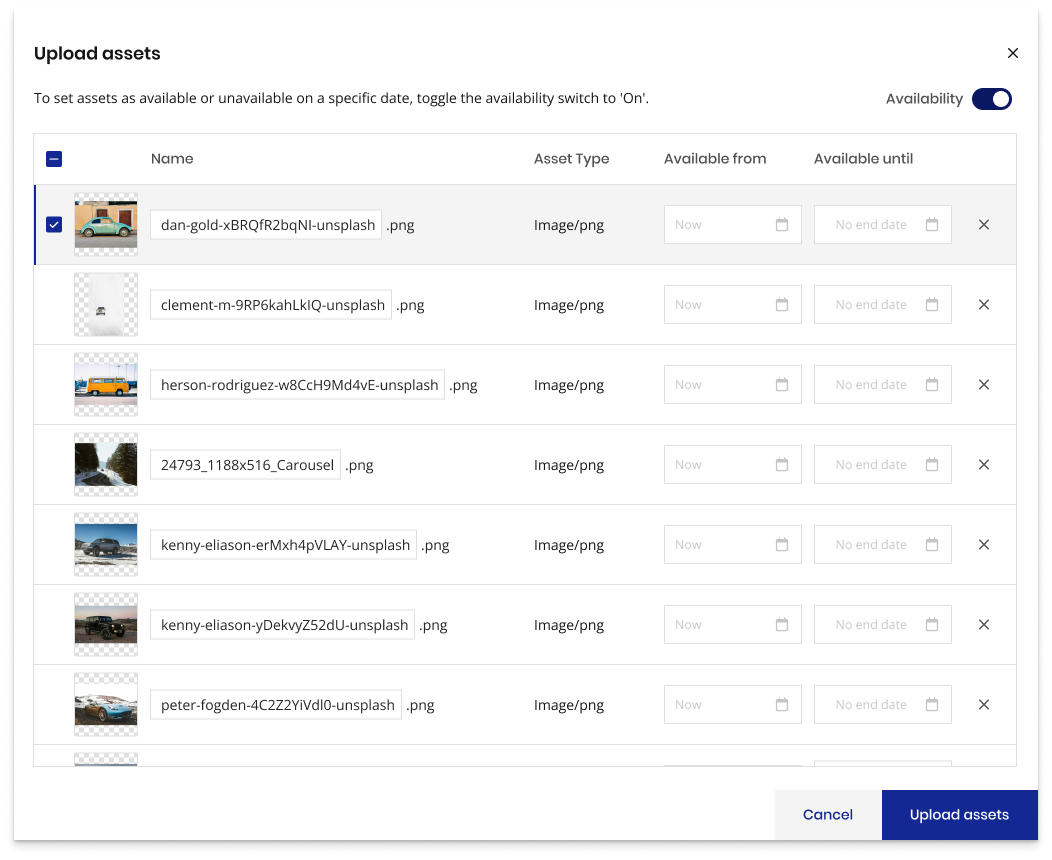
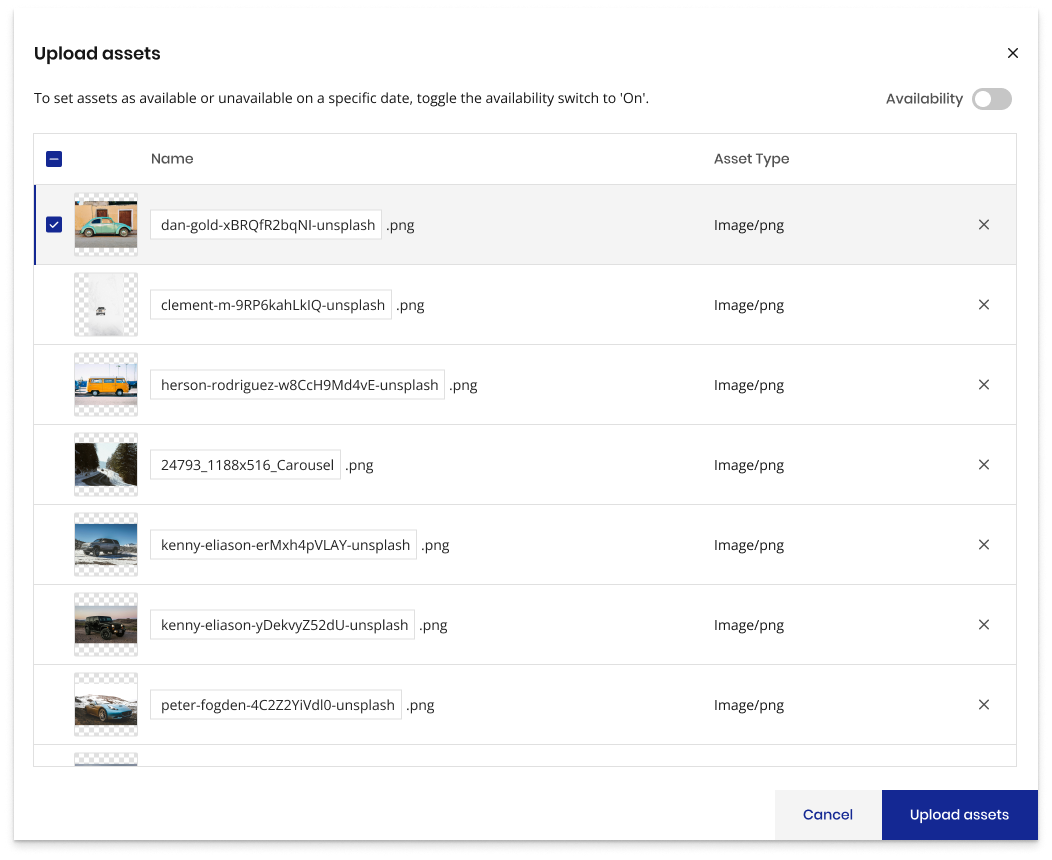
            ? "Bij het uploaden van nieuwe assets kan de gebruiker een beschikbaarheid toggelen en een periode instellen: vanaf en tot wanneer een asset beschikbaar is."
            : "When uploading new assets, the user can toggle availability on and set a period, from and until when the asset is available."}
        </p>
      </section>

      <section className="va-case-section" style={{ display: "grid", gridTemplateColumns: "180px 1fr", gap: 32, padding: "24px 0", borderTop: "1px solid var(--line)" }}>
        <h3 style={{ fontSize: 12, letterSpacing: ".1em", textTransform: "uppercase", color: "var(--muted)", margin: 0, fontWeight: 500 }}>
          03 · {lang === "nl" ? "Verbeteringen" : "Improvements"}
        </h3>
        <p style={{ fontSize: 17, lineHeight: 1.6, margin: 0 }}>
          {lang === "nl"
            ? "Ik heb een indicatie op de asset zelf toegevoegd, een klein icoon met een tooltip bij hover, zodat gebruikers in één oogopslag zien of een asset beschikbaar, nog niet beschikbaar of niet meer beschikbaar is."
            : "I added an indicator on the asset itself, a small icon with a tooltip on hover, so users can see at a glance whether an asset is available, not yet available, or no longer available."}
        </p>
      </section>

      <div style={{ marginTop: 48, marginBottom: 48, padding: "28px 32px", background: "#2B2F3A", color: "#fff", borderRadius: 6 }}>
        <span style={{ fontSize: 11, letterSpacing: ".12em", textTransform: "uppercase", opacity: 0.7 }}>{t.outcome_label}</span>
        <p style={{ fontFamily: "var(--serif)", fontSize: 26, lineHeight: 1.25, margin: "8px 0 0" }}>
          {lang === "nl"
            ? "Een toggle-bare beschikbaarheidsperiode per asset met een duidelijke visuele indicatie, zodat marketeers nooit meer verlopen of nog niet vrijgegeven content gebruiken."
            : "A toggleable availability period per asset with a clear visual indicator, so marketeers never use expired or not-yet-released content by mistake."}
        </p>
      </div>

      <div className="va-photo-grid" style={{ display: "grid", gridTemplateColumns: "1fr 1fr", gap: 16, marginBottom: 16 }}>
        <img src="uploads/Upload assets modal - Availablity.png" alt="Upload assets modal with availability off"
          style={{ width: "100%", display: "block", borderRadius: 6 }}/>
        <img src="uploads/Upload assets modal - Availablity-2-fc93720f.png" alt="Upload assets modal with availability toggled on"
          style={{ width: "100%", display: "block", borderRadius: 6 }}/>
      </div>
      <img src="uploads/Screenshot 2026-07-14 at 15.50.05.png" alt="Asset availability indicators and tooltips"
        style={{ width: "100%", display: "block", borderRadius: 6 }}/>
      </>
      }

      {id === "salesred" &&
      <div style={{ marginTop: 48, padding: "28px 32px", background: "#F45A2A", color: "#fff", borderRadius: 6 }}>
        <span style={{ fontSize: 11, letterSpacing: ".12em", textTransform: "uppercase", opacity: 0.7 }}>{t.outcome_label}</span>
        <p style={{ fontFamily: "var(--serif)", fontSize: 28, lineHeight: 1.2, margin: "8px 0 0" }}>
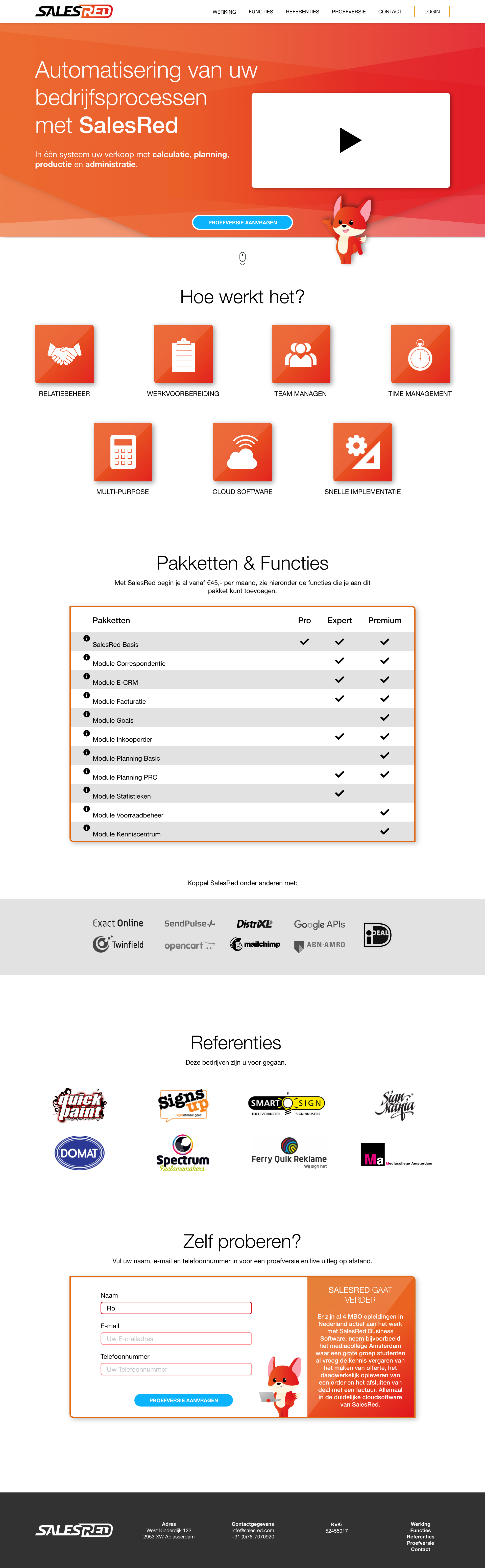
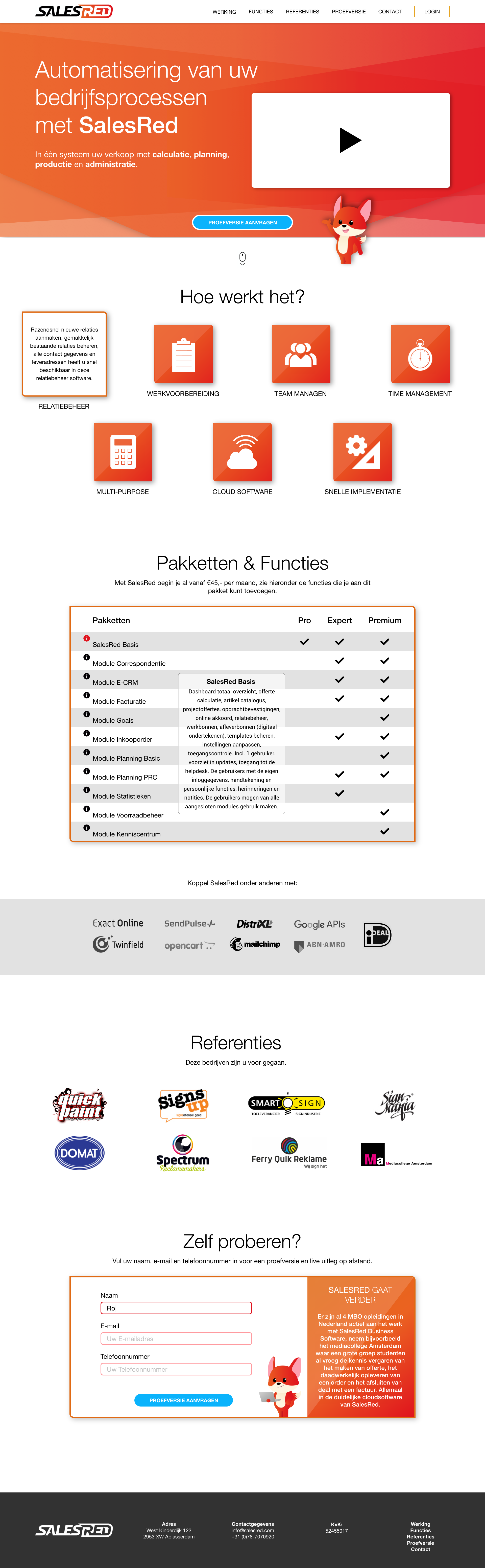
          {lang === "nl" ? "Een compacte one-pager gebouwd die alle informatie op één plek samenbrengt." : "Built a compact one-pager that brings all the information together in one place."}
        </p>
      </div>
      }

      {id === "salesred" &&
      <div className="va-photo-grid" style={{ display: "grid", gridTemplateColumns: "1fr 1fr", gap: 16, marginTop: 40 }}>
        <img src="uploads/0aec2433-9a2a-4a12-9666-3b498ca3e099_rw_1920.png" alt="SalesRed one-pager 1"
          style={{ width: "100%", display: "block", borderRadius: 6 }}/>
        <img src="uploads/425dd737-0b28-4f09-ade8-30271086ffdb_rw_1920.png" alt="SalesRed one-pager 2"
          style={{ width: "100%", display: "block", borderRadius: 6 }}/>
      </div>
      }

      {id === "povis" &&
      <div style={{ marginTop: 48, padding: "28px 32px", background: "#1C1C1E", color: "#fff", borderRadius: 6 }}>
        <span style={{ fontSize: 11, letterSpacing: ".12em", textTransform: "uppercase", opacity: 0.7 }}>{t.outcome_label}</span>
        <p style={{ fontFamily: "var(--serif)", fontSize: 28, lineHeight: 1.2, margin: "8px 0 0" }}>
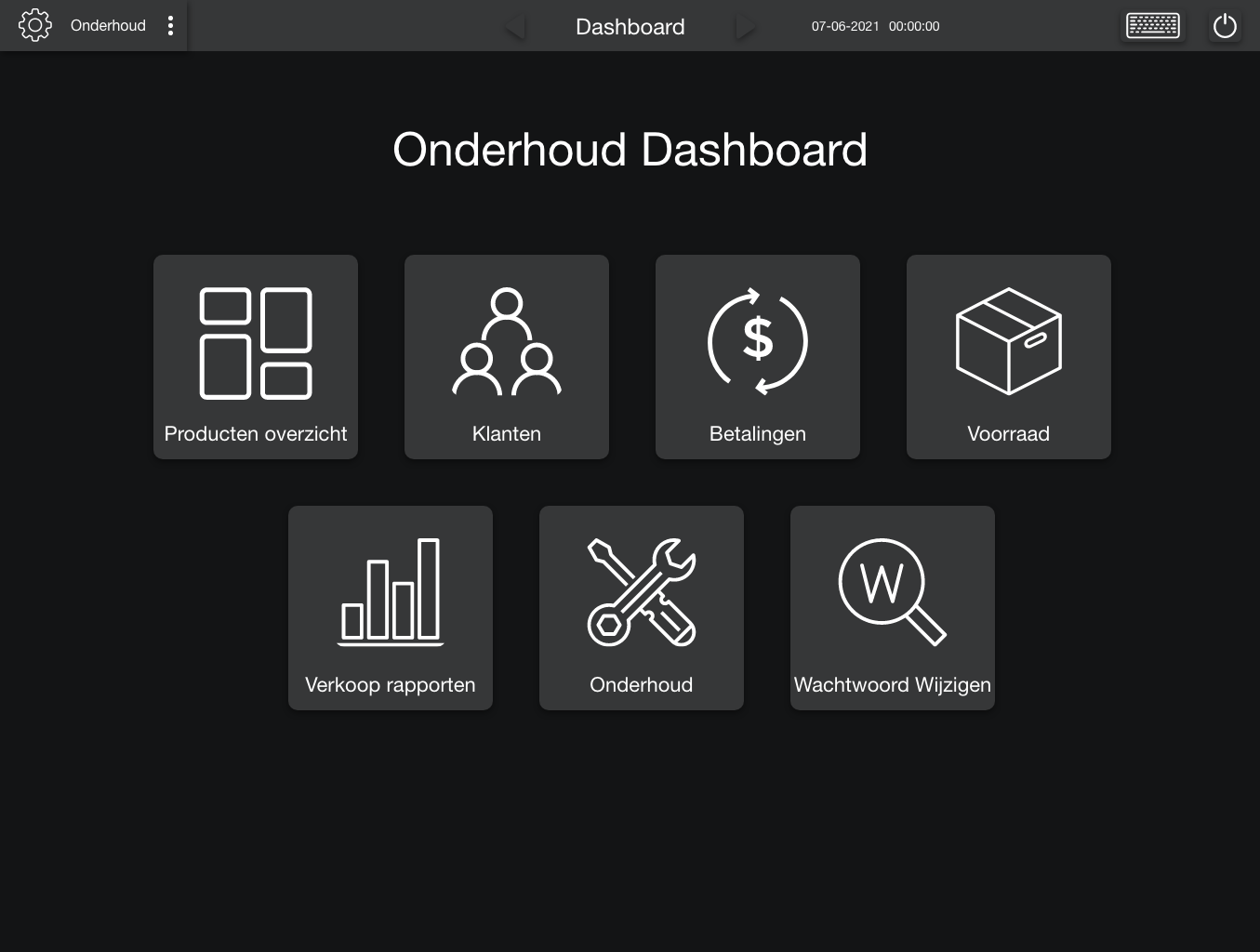
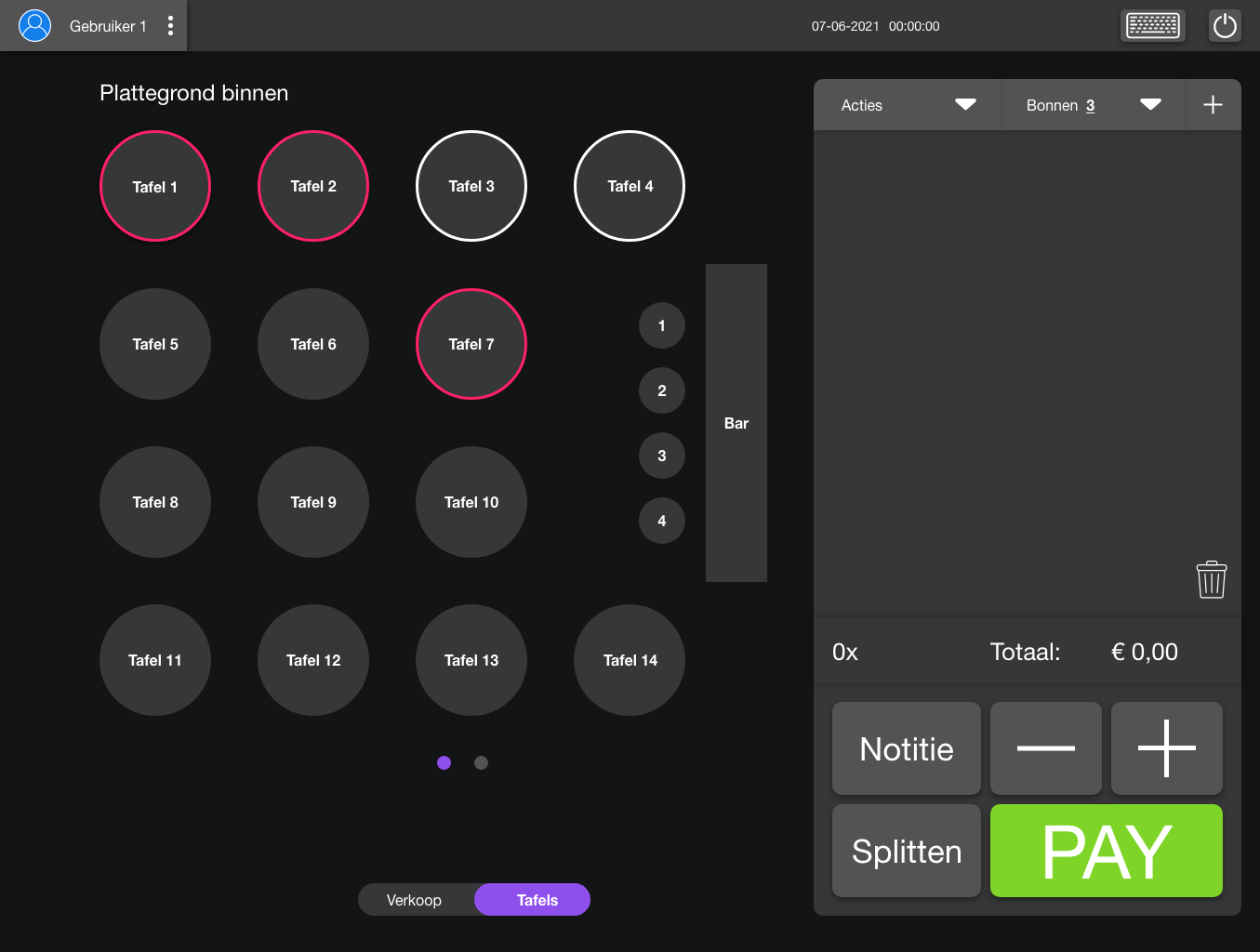
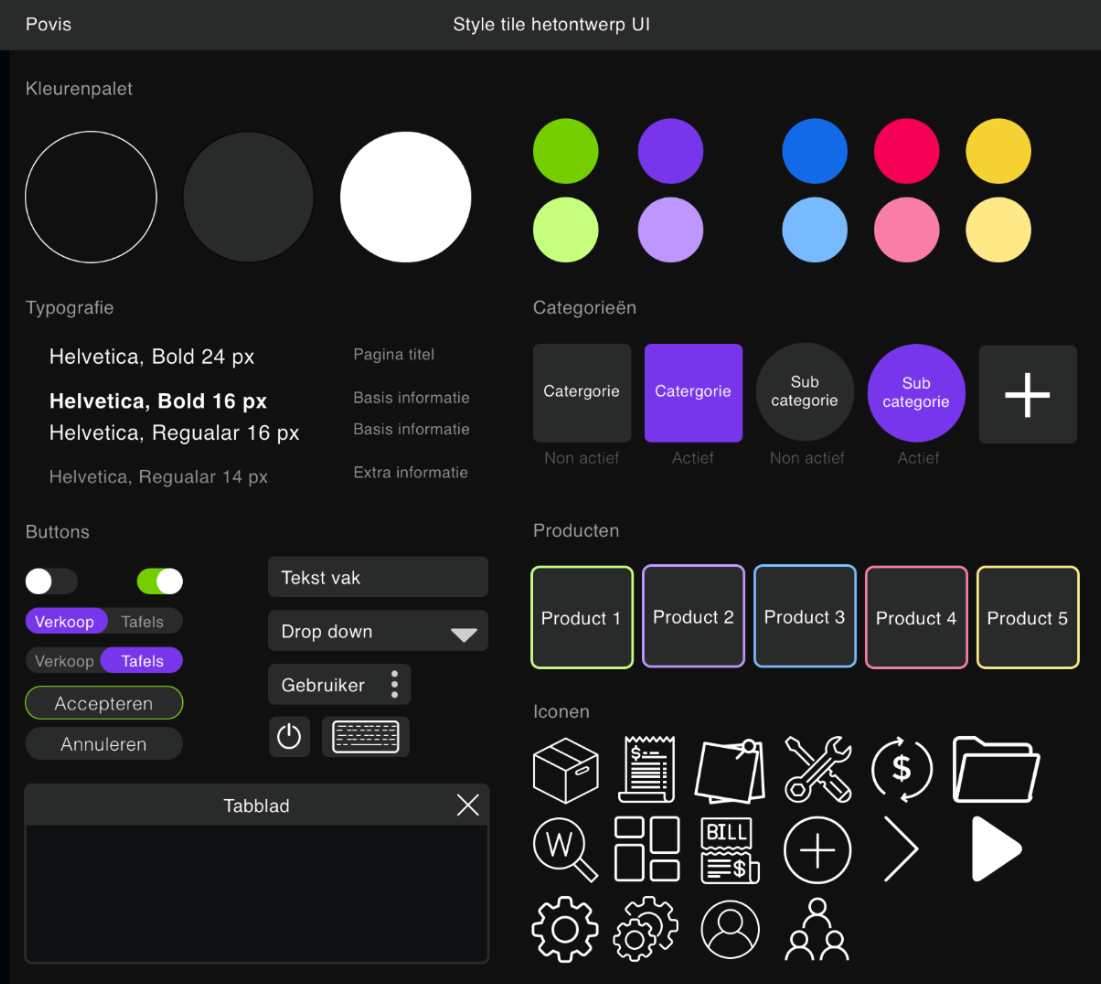
          {lang === "nl" ? "Het hele systeem herontworpen met de nieuwste UI-trends en inzichten uit het onderzoek. Alles vereenvoudigd met een minimalistische aanpak, gebruikmakend van iconen waar mogelijk, en een donker thema om energieverbruik te verlagen, rustiger te zijn voor de ogen en aan te sluiten bij de nachtclubs die klant zijn bij Povis." : "Redesigned the whole system using the newest UI trends and insights from the research, simplifying it with a minimalist approach and icons wherever possible. Used a dark theme to reduce energy costs, ease eye strain, and suit the night clubs among Povis's customers."}
        </p>
      </div>
      }

      {id === "povis" &&
      <>
        <h3 style={{ fontSize: 12, letterSpacing: ".12em", textTransform: "uppercase", color: "var(--muted)", margin: "56px 0 16px", fontWeight: 500 }}>
          {lang === "nl" ? "Style tile" : "Style tile"}
        </h3>
        <img src="uploads/Screenshot 2026-07-09 at 16.41.49 1.png" alt="Povis style tile"
          style={{ width: "100%", display: "block", borderRadius: 6 }}/>
        <h3 style={{ fontSize: 12, letterSpacing: ".12em", textTransform: "uppercase", color: "var(--muted)", margin: "56px 0 16px", fontWeight: 500 }}>
          {lang === "nl" ? "Herontworpen schermen" : "Redesigned screens"}
        </h3>
        <div className="va-photo-grid" style={{ display: "grid", gridTemplateColumns: "1fr 1fr", gap: 16 }}>
          <img src="uploads/582add46-6e83-4023-be0c-e88379d79f29_rw_1920.png" alt="Povis dashboard" style={{ width: "100%", display: "block", borderRadius: 6 }}/>
          <img src="uploads/c83fbaa0-ea39-4e93-830b-f44073941426_rw_1920.png" alt="Povis tables" style={{ width: "100%", display: "block", borderRadius: 6 }}/>
          <img src="uploads/c6450673-88a8-4974-8486-ed6e6851c67e_rw_1920.png" alt="Povis sales" style={{ width: "100%", display: "block", borderRadius: 6 }}/>
          <img src="uploads/d4a28837-d732-478b-9ea7-e403d0769b21_rw_1920.png" alt="Povis reports" style={{ width: "100%", display: "block", borderRadius: 6 }}/>
          <img src="uploads/d65a8c6e-ddb6-4fc8-b4bc-729fd358a88e_rw_1920.png" alt="Povis product overview" style={{ width: "100%", display: "block", borderRadius: 6, gridColumn: "1 / -1" }}/>
        </div>
      </>
      }

      {id === "ia-23" &&
      <div style={{ marginTop: 48, padding: "28px 32px", background: "#E7DCEF", color: "rgba(0,0,0,0.85)", borderRadius: 6 }}>
        <span style={{ fontSize: 11, letterSpacing: ".12em", textTransform: "uppercase", opacity: 0.65 }}>{t.outcome_label}</span>
        <p style={{ fontFamily: "var(--serif)", fontSize: 28, lineHeight: 1.2, margin: "8px 0 0" }}>
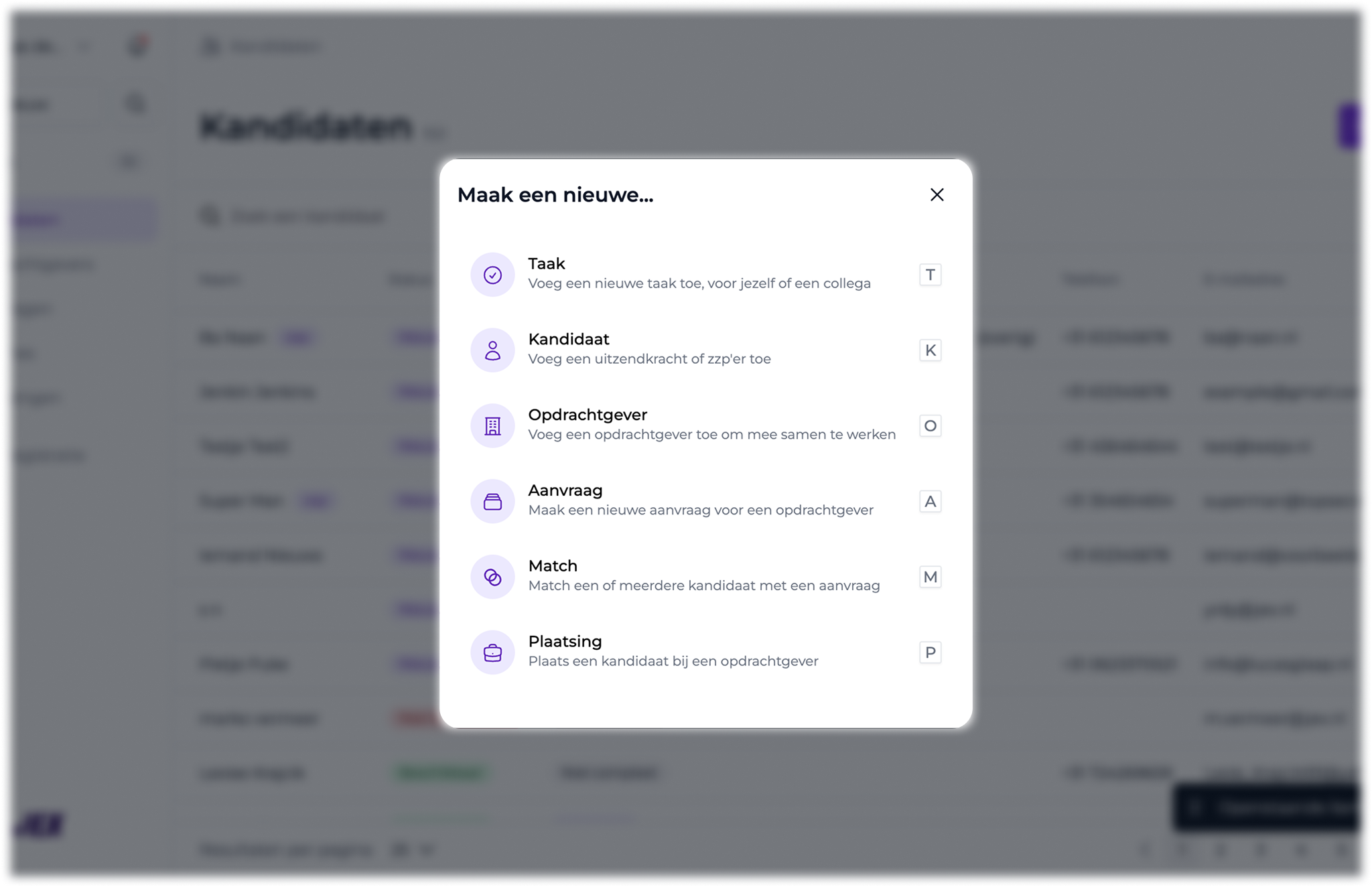
          {lang === "nl" ? "Een centrale plek gemaakt om nieuwe items toe te voegen, in plaats van dat je eerst naar de specifieke pagina moet navigeren om daar op 'toevoegen' te klikken." : "Built a central place to add new items, instead of first having to navigate to that specific page to click 'add' there."}
        </p>
      </div>
      }

      {id === "ia-23" &&
      <>
        <h3 style={{ fontSize: 12, letterSpacing: ".12em", textTransform: "uppercase", color: "var(--muted)", margin: "56px 0 16px", fontWeight: 500 }}>
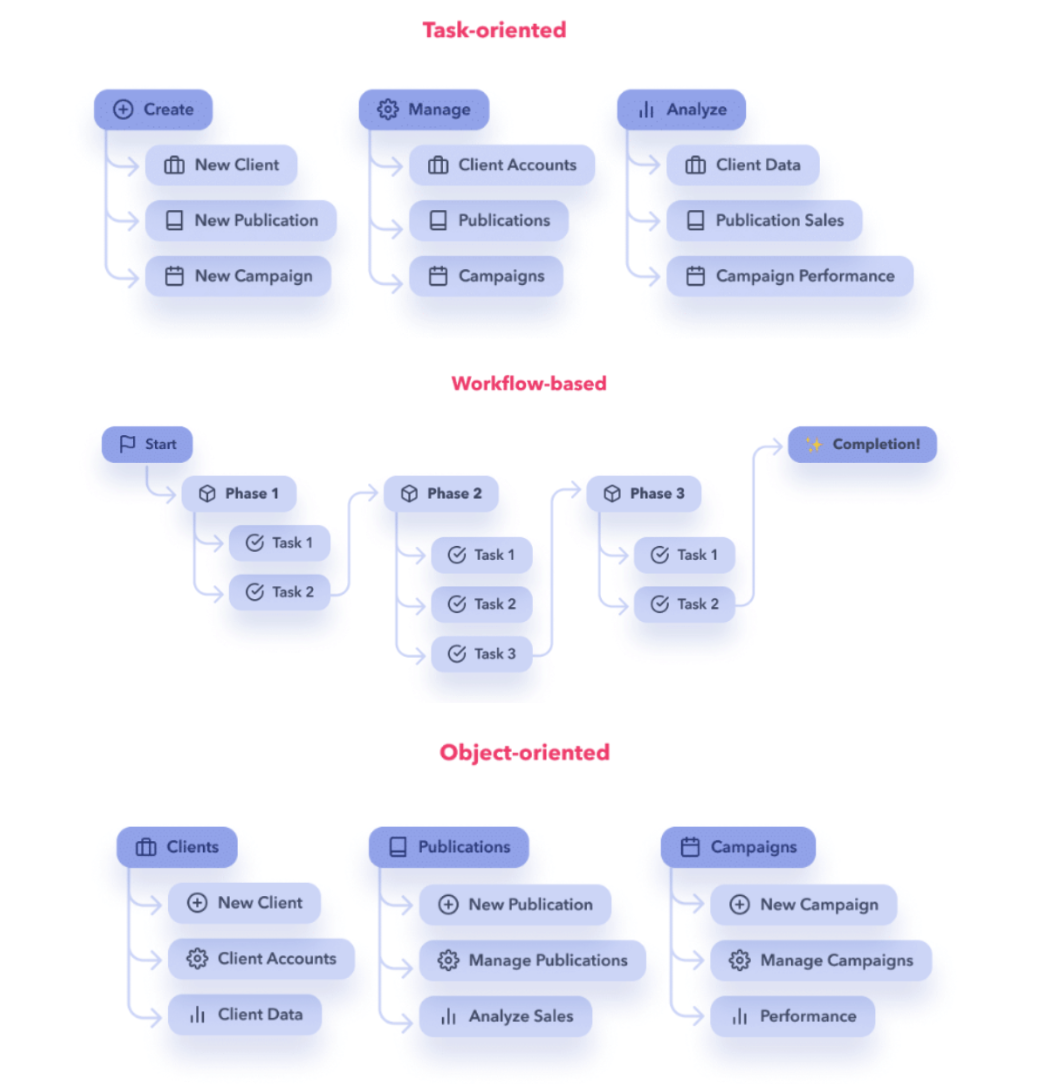
          {lang === "nl" ? "Navigatiepatronen" : "Navigation patterns"}
        </h3>
        <img src="uploads/Group 641.png" alt="Navigation pattern exploration"
          style={{ width: "100%", display: "block", borderRadius: 6, marginBottom: 32 }}/>

        <h3 style={{ fontSize: 12, letterSpacing: ".12em", textTransform: "uppercase", color: "var(--muted)", margin: "0 0 16px", fontWeight: 500 }}>
          {lang === "nl" ? "Verbindingssitemap" : "View connection sitemap"}
        </h3>
        <img src="uploads/Group 642.png" alt="JEX Works sitemap"
          style={{ width: "100%", display: "block", borderRadius: 6, marginBottom: 32 }}/>

        <h3 style={{ fontSize: 12, letterSpacing: ".12em", textTransform: "uppercase", color: "var(--muted)", margin: "0 0 16px", fontWeight: 500 }}>
          {lang === "nl" ? "MENU VARIATIONS" : "MENU VARIATIONS"}
        </h3>
        <img src="uploads/Screenshot 2026-07-10 at 10.08.34.png" alt="Central add menu"
          style={{ width: "60%", display: "block", borderRadius: 6, margin: "0 auto" }}/>
      </>
      }

      {id === "backoffice-22" &&
      <>
        <h3 style={{ fontSize: 12, letterSpacing: ".12em", textTransform: "uppercase", color: "#1A1A1C", margin: "0 0 16px", fontWeight: 700 }}>
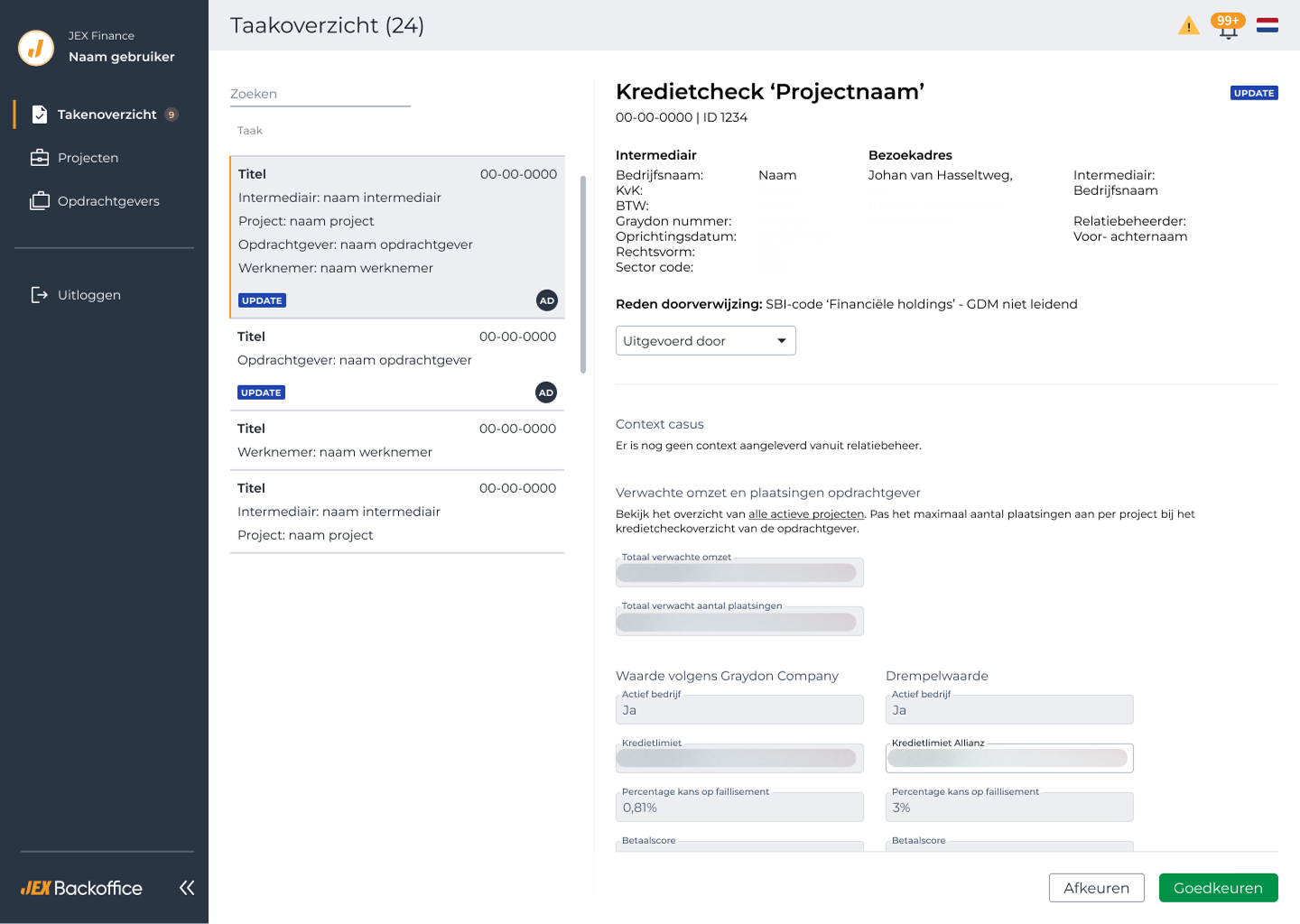
          Case 1: Task View
        </h3>
        <section className="va-case-section" style={{ display: "grid", gridTemplateColumns: "180px 1fr", gap: 32, padding: "24px 0", borderTop: "1px solid var(--line)", marginTop: 0 }}>
          <h3 style={{ fontSize: 12, letterSpacing: ".1em", textTransform: "uppercase", color: "var(--muted)", margin: 0, fontWeight: 500 }}>
            01 · {lang === "nl" ? "Het probleem" : "The problem"}
          </h3>
          <p style={{ fontSize: 17, lineHeight: 1.6, margin: 0 }}>
            {lang === "nl"
              ? "Er was geen duidelijke ruimte waar gebruikers kritieke taken konden bekijken en afronden die van invloed zijn op payroll, contracten en operations."
              : "There was no clear space where users could view and complete critical tasks affecting payroll, contracts and operations."}
          </p>
        </section>

        <section className="va-case-section" style={{ display: "grid", gridTemplateColumns: "180px 1fr", gap: 32, padding: "24px 0", borderTop: "1px solid var(--line)" }}>
          <h3 style={{ fontSize: 12, letterSpacing: ".1em", textTransform: "uppercase", color: "var(--muted)", margin: 0, fontWeight: 500 }}>
            02 · {lang === "nl" ? "Onderzoek" : "Discovery"}
          </h3>
          <p style={{ fontSize: 17, lineHeight: 1.6, margin: 0 }}>
            {lang === "nl"
              ? "Ik heb vergelijkbare tools met soortgelijke doelen bekeken, zoals e-mailplatforms, en het scherm ingedeeld in eenvoudige, scanbare secties."
              : "I reviewed similar tools with comparable goals, such as email platforms, and organized the screen into simple, scannable sections."}
          </p>
        </section>

        <section className="va-case-section" style={{ display: "grid", gridTemplateColumns: "180px 1fr", gap: 32, padding: "24px 0", borderTop: "1px solid var(--line)" }}>
          <h3 style={{ fontSize: 12, letterSpacing: ".1em", textTransform: "uppercase", color: "var(--muted)", margin: 0, fontWeight: 500 }}>
            03 · {lang === "nl" ? "Oplossing" : "Solution"}
          </h3>
          <p style={{ fontSize: 17, lineHeight: 1.6, margin: 0 }}>
            {lang === "nl"
              ? "Een herbruikbare, schaalbare Task View die de zichtbaarheid van taken verbetert, gemiste acties vermindert en toekomstige workflow-automatisering ondersteunt."
              : "A reusable, scalable Task View that improves task visibility, reduces missed actions and supports future workflow automation."}
          </p>
        </section>

        <section className="va-case-section" style={{ display: "grid", gridTemplateColumns: "180px 1fr", gap: 32, padding: "24px 0", borderTop: "1px solid var(--line)" }}>
          <h3 style={{ fontSize: 12, letterSpacing: ".1em", textTransform: "uppercase", color: "var(--muted)", margin: 0, fontWeight: 500 }}>
            04 · {lang === "nl" ? "Oplevering" : "Handoff"}
          </h3>
          <p style={{ fontSize: 17, lineHeight: 1.6, margin: 0 }}>
            {lang === "nl"
              ? "Ontwerpen voor duidelijkheid in complexe omgevingen vraagt om het vereenvoudigen van dichte data zonder essentiële details te verliezen, dit vormde de leidraad voor de uiteindelijke Task View."
              : "Designing for clarity in high-complexity environments requires simplifying dense data without losing essential detail, this became the guiding principle for the final Task View."}
          </p>
        </section>

        <div style={{ marginTop: 48, marginBottom: 48, padding: "28px 32px", background: "#4A6FA5", color: "#fff", borderRadius: 6 }}>
          <span style={{ fontSize: 11, letterSpacing: ".12em", textTransform: "uppercase", opacity: 0.7 }}>{t.outcome_label}</span>
          <p style={{ fontFamily: "var(--serif)", fontSize: 28, lineHeight: 1.2, margin: "8px 0 0" }}>
            {lang === "nl"
              ? "Een schaalbare Task View die taken duidelijk en scanbaar maakt, zodat er minder gemist wordt."
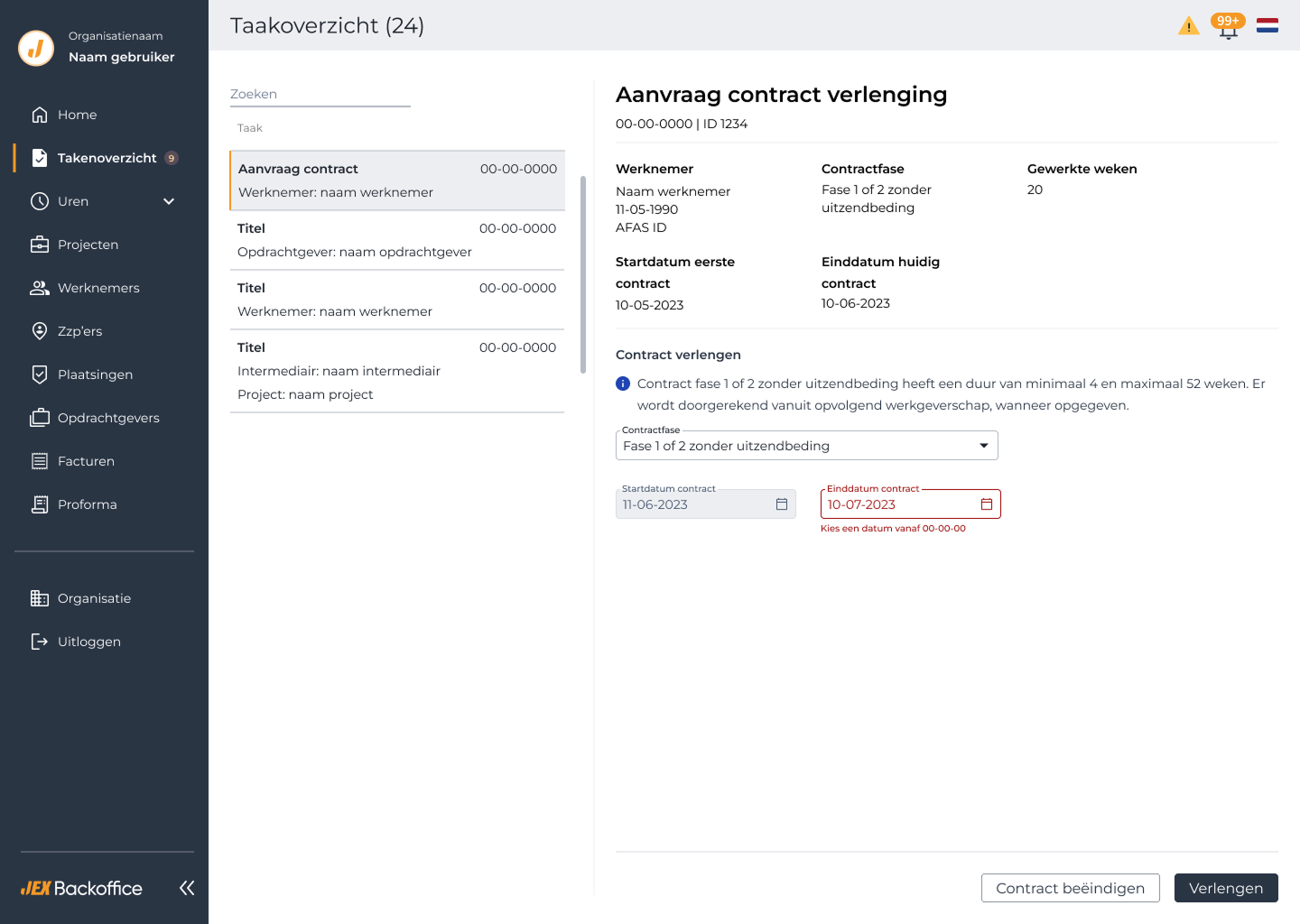
              : "A scalable Task View that makes tasks clear and scannable, so less gets missed."}
          </p>
        </div>

        <h3 style={{ fontSize: 12, letterSpacing: ".12em", textTransform: "uppercase", color: "var(--muted)", margin: "0 0 16px", fontWeight: 500 }}>
          Result
        </h3>
        <div className="va-photo-grid" style={{ display: "grid", gridTemplateColumns: "1fr 1fr", gap: 16 }}>
          <img src="uploads/2 16.png" alt="Task View — contract renewal request"
            style={{ width: "100%", display: "block", borderRadius: 6 }}/>
          <img src="uploads/Group 9.png" alt="Task View — credit check task"
            style={{ width: "100%", display: "block", borderRadius: 6 }}/>
        </div>

        {/* Clearer Form Layout */}
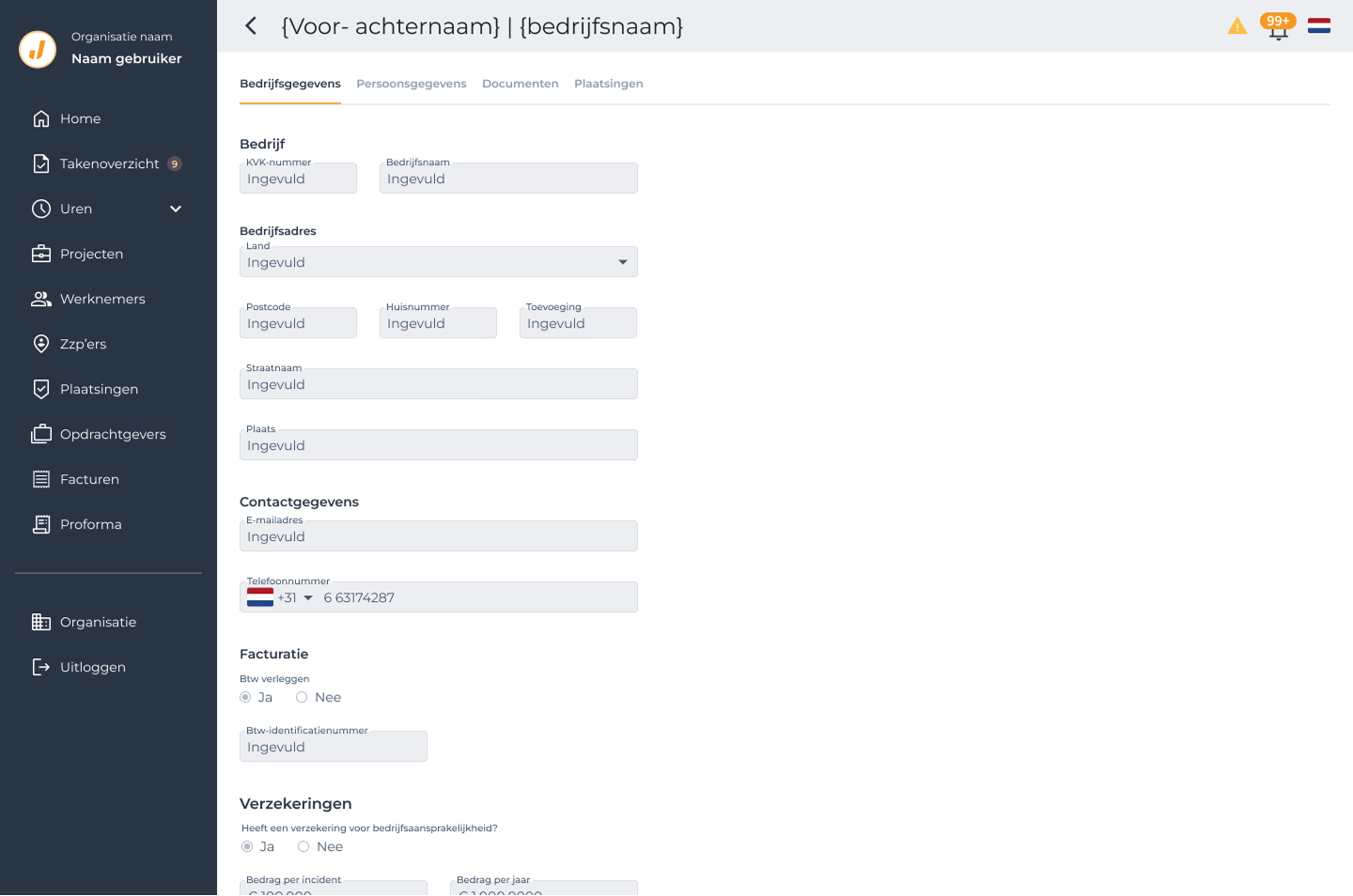
        <h3 style={{ fontSize: 12, letterSpacing: ".12em", textTransform: "uppercase", color: "#1A1A1C", margin: "56px 0 16px", fontWeight: 700 }}>
          Case 2: Clearer Form Layout
        </h3>

        <section className="va-case-section" style={{ display: "grid", gridTemplateColumns: "180px 1fr", gap: 32, padding: "24px 0", borderTop: "1px solid var(--line)" }}>
          <h3 style={{ fontSize: 12, letterSpacing: ".1em", textTransform: "uppercase", color: "var(--muted)", margin: 0, fontWeight: 500 }}>
            01 · {lang === "nl" ? "Doel" : "Objective"}
          </h3>
          <p style={{ fontSize: 17, lineHeight: 1.6, margin: 0 }}>
            {lang === "nl"
              ? "De bruikbaarheid van het platform verbeteren, omdat de originele interface moeilijk te lezen was en pagina's onnodig lang waren."
              : "Improve usability across the platform, as the original interface was difficult to read and pages were overly long."}
          </p>
        </section>

        <section className="va-case-section" style={{ display: "grid", gridTemplateColumns: "180px 1fr", gap: 32, padding: "24px 0", borderTop: "1px solid var(--line)" }}>
          <h3 style={{ fontSize: 12, letterSpacing: ".1em", textTransform: "uppercase", color: "var(--muted)", margin: 0, fontWeight: 500 }}>
            02 · {lang === "nl" ? "Verbeteringen" : "Improvements"}
          </h3>
          <p style={{ fontSize: 17, lineHeight: 1.6, margin: 0 }}>
            {lang === "nl"
              ? "Ik heb lange pagina's geherstructureerd, duidelijkere formuliersecties geïntroduceerd en tabs toegevoegd om content te ordenen, zodat de interface makkelijker te scannen en navigeren is."
              : "I restructured long pages, introduced clearer form layouts, and added tabs to organize content, making the interface easier to scan and navigate."}
          </p>
        </section>

        <section className="va-case-section" style={{ display: "grid", gridTemplateColumns: "180px 1fr", gap: 32, padding: "24px 0", borderTop: "1px solid var(--line)" }}>
          <h3 style={{ fontSize: 12, letterSpacing: ".1em", textTransform: "uppercase", color: "var(--muted)", margin: 0, fontWeight: 500 }}>
            03 · {lang === "nl" ? "Knelpunten" : "Pain points"}
          </h3>
          <p style={{ fontSize: 17, lineHeight: 1.6, margin: 0 }}>
            {lang === "nl"
              ? "Zonder design system was het voor developers lastig om ontwerpen consistent te implementeren en duidelijkheid te behouden over schermen heen."
              : "Without a design system, it was challenging for developers to implement designs consistently and maintain clarity across screens."}
          </p>
        </section>

        <section className="va-case-section" style={{ display: "grid", gridTemplateColumns: "180px 1fr", gap: 32, padding: "24px 0", borderTop: "1px solid var(--line)" }}>
          <h3 style={{ fontSize: 12, letterSpacing: ".1em", textTransform: "uppercase", color: "var(--muted)", margin: 0, fontWeight: 500 }}>
            04 · {lang === "nl" ? "Belangrijkste inzichten" : "Key learnings"}
          </h3>
          <p style={{ fontSize: 17, lineHeight: 1.6, margin: 0 }}>
            {lang === "nl"
              ? "Ik heb geleerd om vroeg te ontwerpen voor schaalbaarheid, herbruikbare patronen te maken voor developers, en complexe pagina's op te delen in duidelijke, behapbare secties om bruikbaarheid en implementatie te verbeteren."
              : "I learned to design for scalability early, create reusable patterns for developers, and break complex pages into clear, digestible sections to improve usability and implementation accuracy."}
          </p>
        </section>

        <div style={{ marginTop: 48, marginBottom: 48, padding: "28px 32px", background: "#4A6FA5", color: "#fff", borderRadius: 6 }}>
          <span style={{ fontSize: 11, letterSpacing: ".12em", textTransform: "uppercase", opacity: 0.7 }}>{t.outcome_label}</span>
          <p style={{ fontFamily: "var(--serif)", fontSize: 28, lineHeight: 1.2, margin: "8px 0 0" }}>
            {lang === "nl"
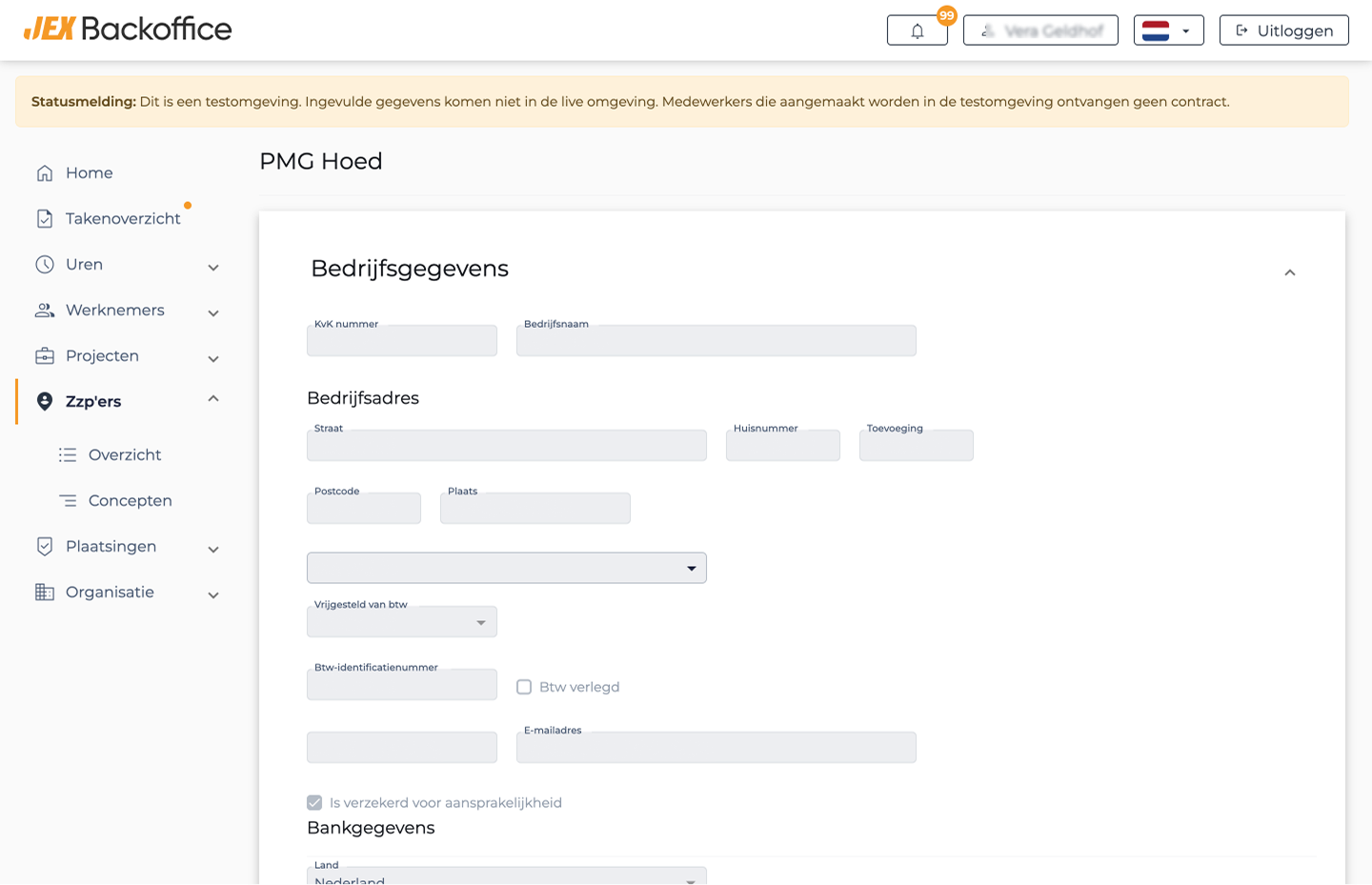
              ? "Lange, onoverzichtelijke pagina's herstructureerd tot duidelijke formulieren met tabs, wat scanbaarheid verbeterde en developers hielp om consistent te implementeren zonder een bestaand design system."
              : "Restructured long, hard-to-scan pages into clear tabbed forms, improving scannability and helping developers implement consistently without an existing design system."}
          </p>
        </div>

        <div className="va-photo-grid" style={{ display: "grid", gridTemplateColumns: "1fr 1fr", gap: 16 }}>
          <div>
            <img src="uploads/Group 7.png" alt="Form layout — before"
              style={{ width: "100%", display: "block", borderRadius: 6 }}/>
            <p style={{ fontSize: 12, color: "var(--muted)", textAlign: "center", marginTop: 8 }}>{lang === "nl" ? "Voor" : "Before"}</p>
          </div>
          <div>
            <img src="uploads/Group 8.png" alt="Form layout — after"
              style={{ width: "100%", display: "block", borderRadius: 6 }}/>
            <p style={{ fontSize: 12, color: "var(--muted)", textAlign: "center", marginTop: 8 }}>{lang === "nl" ? "Resultaat" : "Result"}</p>
          </div>
        </div>

        {/* Rate Calculator */}
        <h3 style={{ fontSize: 12, letterSpacing: ".12em", textTransform: "uppercase", color: "#1A1A1C", margin: "56px 0 16px", fontWeight: 700 }}>
          Case 3: Rate Calculator
        </h3>

        <section className="va-case-section" style={{ display: "grid", gridTemplateColumns: "180px 1fr", gap: 32, padding: "24px 0", borderTop: "1px solid var(--line)" }}>
          <h3 style={{ fontSize: 12, letterSpacing: ".1em", textTransform: "uppercase", color: "var(--muted)", margin: 0, fontWeight: 500 }}>
            01 · {lang === "nl" ? "Het probleem" : "The problem"}
          </h3>
          <p style={{ fontSize: 17, lineHeight: 1.6, margin: 0 }}>
            {lang === "nl"
              ? "Om een prijsafspraak in te stellen moesten gebruikers veel getallen en factoren invullen, zonder te zien wat dit deed met de uiteindelijke kosten per gewerkt uur. Ze hadden er telkens een aparte rekenmachine bij nodig."
              : "To set a price agreement, users had to fill in a lot of numbers and factors without seeing what it did to the total cost per hour worked. They needed a separate calculator every time."}
          </p>
        </section>

        <section className="va-case-section" style={{ display: "grid", gridTemplateColumns: "180px 1fr", gap: 32, padding: "24px 0", borderTop: "1px solid var(--line)" }}>
          <h3 style={{ fontSize: 12, letterSpacing: ".1em", textTransform: "uppercase", color: "var(--muted)", margin: 0, fontWeight: 500 }}>
            02 · {lang === "nl" ? "Oplossing" : "Solution"}
          </h3>
          <p style={{ fontSize: 17, lineHeight: 1.6, margin: 0 }}>
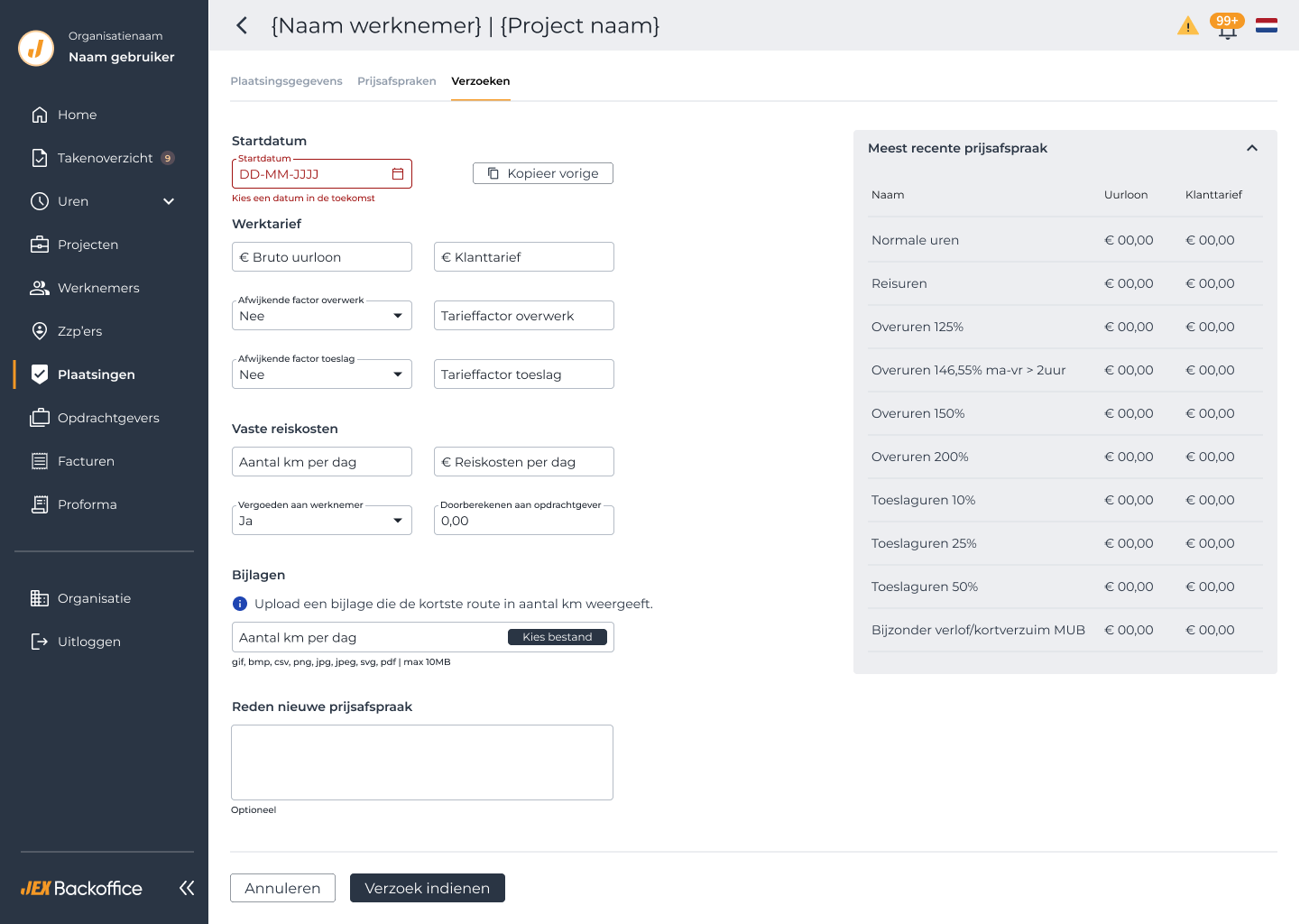
            {lang === "nl"
              ? "Ik heb een ingebouwde calculator naast de invulvelden ontworpen, zodat gebruikers direct na invoer zien wat de medewerker kost en wat ze de opdrachtgever kunnen vragen, voor situaties als reisuren, overuren en toeslagen."
              : "I designed a built-in calculator right next to the input fields, so users see straight after input what the employee costs and what they can charge the client, for cases like travel hours, overtime and surcharges."}
          </p>
        </section>

        <section className="va-case-section" style={{ display: "grid", gridTemplateColumns: "180px 1fr", gap: 32, padding: "24px 0", borderTop: "1px solid var(--line)" }}>
          <h3 style={{ fontSize: 12, letterSpacing: ".1em", textTransform: "uppercase", color: "var(--muted)", margin: 0, fontWeight: 500 }}>
            03 · {lang === "nl" ? "Belangrijkste inzichten" : "Key learnings"}
          </h3>
          <p style={{ fontSize: 17, lineHeight: 1.6, margin: 0 }}>
            {lang === "nl"
              ? "Door berekende uitkomsten dicht bij de invoer te plaatsen, verdwijnt de behoefte aan externe tools en worden fouten voorkomen."
              : "Placing calculated results close to the input removes the need for external tools and prevents mistakes."}
          </p>
        </section>

        <div style={{ marginTop: 48, marginBottom: 48, padding: "28px 32px", background: "#4A6FA5", color: "#fff", borderRadius: 6 }}>
          <span style={{ fontSize: 11, letterSpacing: ".12em", textTransform: "uppercase", opacity: 0.7 }}>{t.outcome_label}</span>
          <p style={{ fontFamily: "var(--serif)", fontSize: 28, lineHeight: 1.2, margin: "8px 0 0" }}>
            {lang === "nl"
              ? "Een prijsafspraak-scherm met een ingebouwde calculator die kosten en tarieven direct berekent, zodat gebruikers geen aparte rekenmachine meer nodig hebben."
              : "A price agreement screen with a built-in calculator that computes costs and rates instantly, so users no longer need a separate calculator."}
          </p>
        </div>

        <img src="uploads/Nieuwe prijsafspraak.png" alt="Rate calculator — price agreement screen"
          style={{ width: "100%", display: "block", borderRadius: 6 }}/>
      </>
      }
    </div>);

}

function Meta({ label, val }) {
  return (
    <div>
      <dt style={{ fontSize: 11, letterSpacing: ".1em", textTransform: "uppercase", color: "var(--muted)", marginBottom: 6 }}>{label}</dt>
      <dd style={{ margin: 0, fontSize: 14 }}>{val}</dd>
    </div>);

}

function CaseThumb({ id }) {
  const p = PROJECTS.find((x) => x.id === id);
  if (!p || !p.thumb) return null;
  return (
    <div className="va-case-thumb" style={{ width: "100%", height: 220, marginTop: 20,
      borderRadius: 14, background: p.bg, display: "flex", alignItems: "center", justifyContent: "center",
      overflow: "hidden", boxShadow: "0 14px 34px rgba(0,0,0,0.14)" }}>
      <img src={p.thumb} alt="" aria-hidden="true"
        style={{ maxWidth: "62%", maxHeight: "80%", width: "auto", height: "auto", objectFit: "contain",
          filter: "drop-shadow(0 12px 24px rgba(0,0,0,0.18))" }} />
    </div>);
}

function nextCaseId(id) {  const i = PROJECTS.findIndex((p) => p.id === id);
  if (i === -1) return PROJECTS[0].id;
  return PROJECTS[(i + 1) % PROJECTS.length].id;
}

function otherProjects(id) {
  const i = PROJECTS.findIndex((p) => p.id === id);
  const out = [];
  for (let k = 1; k <= 3; k++) out.push(PROJECTS[(i + k) % PROJECTS.length]);
  return out;
}

function BackBtn({ onClick, onMore, t }) {
  return (
    <button onClick={onClick} style={{
      background: "none", border: "none", padding: 0, cursor: "pointer",
      color: "var(--muted)", fontFamily: "inherit", fontSize: 13,
      display: "inline-flex", alignItems: "center", gap: 6
    }}
    onMouseEnter={(e) => e.currentTarget.style.color = "var(--fg)"}
    onMouseLeave={(e) => e.currentTarget.style.color = "var(--muted)"}>
      ← {t.backToWork}</button>);

}

function CVPage({ lang, t }) {
  const cv = CV[lang];
  return (
    <div style={{ maxWidth: 920, margin: "0 auto" }}>
      <div style={{ margin: "0 0 60px" }}>
        <p style={{ fontFamily: "var(--serif)", fontSize: "clamp(17px, 1.6vw, 22px)", lineHeight: 1.45, letterSpacing: "-0.005em", margin: 0, width: "100%" }}>
          {cv.intro}
        </p>
      </div>

      <Section title={t.cv.experience}>
        <div style={{ display: "flex", flexDirection: "column", gap: 12, paddingTop: 4 }}>
          {cv.experience.map((e, i) => (
              <div key={i} className="va-cv-row" style={{ display: "grid", gridTemplateColumns: "150px 1fr 120px", gap: 24, padding: "20px 24px", borderRadius: 8, backgroundColor: "#D8DCE5" }}>
                <span style={{ fontSize: 13, color: "rgba(0,0,0,0.55)" }}>{e.yr}</span>
                <div>
                  <strong style={{ fontWeight: 500, fontSize: 16 }}>{e.role}</strong>
                  <span style={{ color: "rgba(0,0,0,0.55)" }}> · {e.co}</span>
                  <ul style={{ margin: "8px 0 0", paddingLeft: 18, fontSize: 14, lineHeight: 1.55 }}>
                    {e.bullets.map((b, j) => <li key={j} style={{ color: "rgba(0,0,0,0.6)" }}>{b}</li>)}
                  </ul>
                  {e.tags &&
                  <div style={{ display: "flex", flexWrap: "wrap", gap: 6, marginTop: 12 }}>
                    {e.tags.map((tag, j) =>
                      <span key={j} style={{ fontSize: 11, letterSpacing: ".02em", color: "rgba(0,0,0,0.6)", background: "rgba(255,255,255,0.55)", border: "0.5px solid rgba(0,0,0,0.12)", borderRadius: 999, padding: "3px 10px" }}>{tag}</span>
                    )}
                  </div>}
                </div>
                <span className="va-cv-loc" style={{ fontSize: 13, color: "rgba(0,0,0,0.55)", textAlign: "right" }}>{e.loc}</span>
              </div>
          ))}
        </div>
      </Section>

      <Section title={t.cv.education}>
        <div style={{ display: "flex", flexDirection: "column", gap: 12, paddingTop: 4 }}>
          {cv.education.map((e, i) => (
              <div key={i} className="va-cv-row" style={{ display: "grid", gridTemplateColumns: "180px 1fr", gap: 24, padding: "20px 24px", borderRadius: 8, backgroundColor: "#E5DCD9" }}>
                <span style={{ fontSize: 13, color: "rgba(0,0,0,0.55)" }}>{e.yr}</span>
                <div>
                  <strong style={{ fontWeight: 500 }}>{e.deg}</strong>
                  <div style={{ color: "rgba(0,0,0,0.55)", fontSize: 14, marginTop: 4 }}>{e.sch}</div>
                </div>
              </div>
          ))}
        </div>
      </Section>

      <div className="va-cv-skills-langs" style={{ display: "grid", gridTemplateColumns: "1fr 1fr", gap: 48 }}>
        <Section title={t.cv.skills}>
          <div style={{ display: "flex", flexWrap: "wrap", gap: 8, padding: "12px 0" }}>
            {cv.skills.map((s, i) => {
              const chips = [
                { bg: "#E8EAF1", fg: "#2B2F3A" },
                { bg: "#F4E9DC", fg: "#8A5A2B" },
                { bg: "#DCE9E3", fg: "#2E6B52" },
                { bg: "#E7DCEF", fg: "#5E3B8A" },
                { bg: "#F9C9E0", fg: "#C9176C" },
                { bg: "#CFE3EC", fg: "#1E4F6B" },
                { bg: "#F2D7CF", fg: "#6B3B2E" },
                { bg: "#BFE8C7", fg: "#1F5A2E" },
              ];
              const c = chips[i % chips.length];
              return <span key={i} style={{ background: c.bg, color: c.fg, borderRadius: 999, padding: "6px 14px", fontSize: 13, fontWeight: 500 }}>{s}</span>;
            })}
          </div>
        </Section>

        <Section title={t.cv.languages}>
          <div style={{ display: "flex", flexDirection: "column", gap: 0 }}>
            {cv.languages.map((l, i) =>
            <div key={i} style={{ display: "flex", justifyContent: "space-between", padding: "14px 0", borderTop: "1px solid var(--line)" }}>
                <span style={{ fontSize: 15 }}>{l.lang}</span>
                <span style={{ fontSize: 13, color: "var(--muted)" }}>{l.level}</span>
              </div>
            )}
          </div>
        </Section>
      </div>
    </div>);

}

function Section({ title, children }) {
  return (
    <section style={{ marginBottom: 56 }}>
      <h3 style={{ fontSize: 16, letterSpacing: ".12em", textTransform: "uppercase", color: "var(--muted)", margin: "0 0 12px", fontWeight: 500 }}>{title}</h3>
      {children}
    </section>);

}

function AboutPage({ lang, t }) {
  const a = t.about;
  return (
    <div style={{ maxWidth: 1080, margin: "0 auto" }}>
      <div className="va-about-grid" style={{ display: "grid", gridTemplateColumns: "1fr 1fr", gap: 56, alignItems: "start" }}>
        <div>
          <p style={{ fontFamily: "var(--serif)", fontSize: "clamp(22px, 2.4vw, 30px)", lineHeight: 1.35, letterSpacing: "-0.005em", margin: "0 0 32px" }}>
            {a.lede}
          </p>
          {a.paragraphs.map((par, i) =>
          <p key={i} style={{ fontSize: 16, lineHeight: 1.65, margin: "0 0 18px", color: "var(--fg)" }}>{par}</p>
          )}

          {/* Beyond work + Design philosophy — same column as the intro */}

          <section style={{ marginTop: 40 }}>
            <h3 style={{ fontSize: 12, letterSpacing: ".12em", textTransform: "uppercase", color: "var(--muted)", margin: "0 0 16px", fontWeight: 500 }}>
              {a.beyondTitle}
            </h3>
            <ul style={{ margin: 0, paddingLeft: 18, fontSize: 16, lineHeight: 1.65, color: "var(--fg)" }}>
            {a.beyondParagraphs.map((par, i) => (
              <li key={i} style={{ marginBottom: 8 }}>{par}</li>
            ))}
            </ul>
          </section>

          <section style={{ marginTop: 44 }}>
            <h3 style={{ fontSize: 12, letterSpacing: ".12em", textTransform: "uppercase", color: "var(--muted)", margin: "0 0 16px", fontWeight: 500 }}>
              {a.philosophyTitle}
            </h3>
            <ul style={{ margin: 0, paddingLeft: 18, fontSize: 16, lineHeight: 1.65, color: "var(--fg)" }}>
            {a.philosophyParagraphs.map((par, i) => (
              <li key={i} style={{ marginBottom: 8 }}>{par}</li>
            ))}
            </ul>
          </section>
        </div>
        {/* Real photo */}
        <figure style={{ margin: 0 }}>
          <div style={{
            aspectRatio: "4/5", borderRadius: 4, overflow: "hidden"
          }}>
            <img src="uploads/Profile Pic recolored.jpg" alt="Rowan de Maa"
            style={{ width: "100%", height: "100%", objectFit: "cover", objectPosition: "center top", display: "block" }} />
          </div>
          <figcaption style={{ fontSize: 12, color: "var(--muted)", marginTop: 10, fontStyle: "italic", fontFamily: "var(--serif)" }}>
            {a.photoCaption}
          </figcaption>
        </figure>
      </div>
    </div>);

}

function ContactPage({ lang, t }) {
  return (
    <div style={{ maxWidth: 760, margin: "0 auto" }}>
      <h2 style={{ fontFamily: "var(--serif)", fontSize: "clamp(24px, 2.6vw, 36px)", lineHeight: 1.2, letterSpacing: "-0.01em", fontWeight: 400, margin: "0 0 32px" }}>
        {lang === "en" ? "My contact details." : "Mijn contactgegevens."}
      </h2>
      <ul style={{ listStyle: "none", padding: 0, margin: 0, borderTop: "1px solid var(--line)" }}>
        {[
        ["Email", "rowandem@gmail.com"],
        ["LinkedIn", "linkedin.com/in/rowan-d-137489a7"],
        ["Instagram", "@rowandem"]].
        map(([k, v]) =>
        <li key={k} style={{ display: "flex", justifyContent: "space-between", padding: "20px 0", borderBottom: "1px solid var(--line)" }}>
            <span style={{ fontSize: 13, letterSpacing: ".1em", textTransform: "uppercase", color: "var(--muted)" }}>{k}</span>
            <span style={{ fontSize: 17, fontFamily: "var(--serif)" }}>{v}</span>
          </li>
        )}
      </ul>
    </div>);

}

Object.assign(window, { VariantA });